How to Build Solar-Powered CCTV for Remote Sites
Plan a reliable off-grid CCTV system from site survey to acceptance, including recording, wireless backhaul, solar power and outage testing.
By Maxsol Team

To build a solar powered CCTV system for remote areas, first confirm that the site has usable camera views, sufficient solar exposure, a practical communications path and safe equipment-mounting positions. Then define the recording architecture, calculate every continuous and peak electrical load, size the solar system for the required autonomy, verify all power interfaces, and commission the complete system under night and outage conditions.
Treat the cameras, recorder, network equipment, solar supply and backhaul as separate subsystems until their interfaces have been checked. A panel-and-battery rating alone does not establish 24/7 operation, and a wireless product’s distance label does not guarantee throughput at a particular New Zealand site.
Survey coverage and remote-site constraints
A remote CCTV project should begin with a go/no-go survey rather than a product list. The survey determines whether the required images, power generation and data path are achievable from the available mounting locations.
Confirm the surveillance objective
Write down what each camera must show and what evidence the operator needs. “Monitor the gate” is too vague. A useful requirement states:
- the target area and viewing direction;
- whether detection, observation, recognition or identification is expected;
- the critical operating periods;
- the required recording retention;
- whether live viewing is essential or occasional;
- whether alerts must leave the site immediately;
- who will retrieve footage after a communications failure.
Inspect the proposed view at the times most likely to cause problems. Low sun, vehicle headlights, rain, moving vegetation and built-in infrared illumination can all produce a different result from a daytime survey.
Complete the go/no-go checks
Do not proceed to detailed equipment selection until these questions have defensible answers:
| Survey item | Go condition | Warning or no-go condition |
|---|---|---|
| Camera coverage | Required scene is visible from a secure mounting point | Obstructions, excessive distance or uncontrolled glare prevent the required image |
| Solar exposure | A panel position has suitable exposure without predictable shading | Trees, terrain, buildings or the camera mast shade the panel during critical periods |
| Equipment mounting | Structure can support the proposed equipment and environmental loads | Pole or structure condition is unknown, unstable or inaccessible |
| Wireless path | Line of sight and Fresnel clearance can be investigated and tested | Terrain, vegetation or structures block the intended path |
| Cellular service | Signal and data service can be verified at equipment height | Coverage is absent, unstable or available only at ground-test locations that will not be used |
| Maintenance access | Battery, enclosure, connectors and storage can be inspected safely | Routine access would require unsafe or impractical work |
| Security | Enclosures, cables and recording media can be protected | Equipment is readily accessible to tampering or theft |
| Permissions | Landowner, mounting, radio and installation requirements can be met | Responsibilities or approvals remain unresolved |
For New Zealand rural, coastal and exposed sites, the survey should also record salt exposure, prevailing weather, dust, livestock, vegetation growth and the likelihood of insects entering enclosures. These conditions affect mounting and protection choices even when the electronic load remains unchanged.
Choose recording and backhaul architecture
Recording and backhaul are related but not the same. A CCTV system can continue recording locally even when its external connection fails, provided the recorder, cameras and local network remain powered.
| Architecture | Main advantage | Main limitation | Best suited to |
|---|---|---|---|
| Local recording only | Lowest dependence on external communications | No immediate remote access or off-site alerting | Sites inspected regularly or where footage is retrieved after an event |
| Local recording plus point-to-point wireless | Preserves evidence locally while providing remote access | Requires a suitable radio path and equipment at both ends | Farms, yards and infrastructure within reach of an existing network |
| Local recording plus cellular | Can operate where no fixed network endpoint exists | Data use, signal variation and carrier dependency must be managed | Dispersed sites with verified mobile coverage |
| Remote recording only | Centralises storage | A backhaul or central-system failure can interrupt recording | Applications with highly reliable communications and clear failure handling |
| Hybrid local and remote recording | Provides local resilience and remote visibility | Higher load, configuration complexity and storage management | Security-critical sites requiring continued recording through link outages |
For most remote installations, local recording with a separately engineered backhaul is the more resilient starting point. It avoids making video retention entirely dependent on a radio or cellular service.
Local recording considerations
Confirm:
- the number of camera streams;
- recording resolution, frame rate and compression settings;
- continuous versus event recording;
- storage capacity and retention policy;
- storage behaviour when full;
- time synchronisation;
- export format and evidence retrieval process;
- recorder restart behaviour after loss of power.
Do not assume that a camera’s memory card and a network video recorder behave identically. Check overwrite rules, event indexing and whether footage remains accessible if the network is unavailable.
Point-to-point wireless backhaul
A directional wireless bridge can connect the CCTV site to a building or network location with mains power and internet access. This can reduce recurring data usage, but it depends on a viable path.
The Maxsol CPE295 5.8GHz wireless CPE is one component that may be considered for this role. Its documented features include 5.8GHz operation, a 2×2 14dBi directional MIMO antenna, one Gigabit LAN port, IEEE 802.3af/at or 9–48V DC power support, and 6.5W full-load consumption.
Those specifications do not guarantee link distance or application throughput. Verify actual line of sight, Fresnel-zone clearance, interference, mounting alignment, channel planning, network capacity and applicable New Zealand radio requirements. The remote radio and its corresponding endpoint must also be configured as a complete link.
Cellular backhaul
Cellular is useful where there is no suitable wireless endpoint, but signal bars on a handheld phone are not sufficient design evidence. Test the intended service and SIM at the proposed antenna height and enclosure location.
Estimate data consumption from the real operating policy. Continuous high-resolution streaming can use substantially more data than health checks, event clips or occasional live viewing. Also define what happens when the cellular link fails: local recording should continue, queued alerts should be handled sensibly, and the system should reconnect without requiring an on-site reset.
Cameras, recorders and cellular modems are not implied to be included with the linked power or radio components. Select them separately and verify their electrical and network interfaces.
Establish the complete power budget
List every device that draws power, including losses and equipment that is easy to overlook. The budget should cover:
- all cameras in daytime and night modes;
- recorder or edge storage;
- Ethernet or PoE switch;
- wireless CPE or cellular modem;
- DC-to-DC or DC-to-PoE converters;
- enclosure heating, ventilation or controls if used;
- relays, sensors and auxiliary lighting;
- standby and restart loads;
- conversion and cable losses.
Use each device’s maximum documented input power where practical. Average consumption may help estimate energy use, but the system must also support simultaneous peak demand, such as cameras changing to night mode while a radio is transmitting and a recorder is starting.
The basic daily-energy relationship is:
Daily load energy in Wh = total average load in W × operating hours
However, that is only the starting point. Solar and battery sizing must also account for conversion losses, battery operating limits, temperature, expected low-generation periods, autonomy requirements and controller constraints.
Hypothetical power-budget example
The following figures are assumptions for illustrating the method, not measured product performance:
| Assumed load | Quantity | Assumed power | Subtotal |
|---|---|---|---|
| Cameras | 4 | 6W each | 24W |
| Local recorder | 1 | 8W | 8W |
| Network equipment | 1 group | 5W | 5W |
| CPE295 at documented full load | 1 | 6.5W | 6.5W |
| Total continuous load | 43.5W |
At an assumed continuous 43.5W:
43.5W × 24 hours = 1,044Wh per day
That result is load energy before allowing for conversion losses, battery reserve or low-solar periods. It demonstrates why panel wattage or nominal battery capacity should not be selected by camera count alone.
Use the full workflow in the off-grid solar sizing guide for CCTV systems to convert the verified load into panel, storage and autonomy requirements rather than relying on a generic battery-runtime claim.
Specify solar storage and power interfaces
Once the load is established, map the complete electrical path:
Solar panel → charge controller → battery → protection → DC distribution → converter or PoE equipment → cameras, recorder and backhaul
Every transition needs compatible voltage, current, polarity, connector and protocol details.
The Maxsol CS12060 120W and 768Wh solar power system documents a 120W monocrystalline panel, 12.8V 60Ah 768Wh LiFePO4 battery, MPPT controller and three DC12V outputs. RS485 is optional.
Its 768Wh figure is nominal battery energy, not guaranteed usable energy delivered to CCTV loads. Before selection, confirm the current datasheet and supplied configuration, including:
- controller PV voltage, current and power limits;
- allowed battery charging temperatures;
- low-voltage and overcurrent protection behaviour;
- DC output current limits;
- cable and connector configuration;
- monitoring interface, if required;
- reserve and autonomy appropriate to the site.
Do not assume this system is large enough because its nominal battery figure exceeds a partial daily load. Usable energy depends on system limits, operating conditions, conversion stages and the reserve required for reliable recovery.
Converting battery DC to PoE
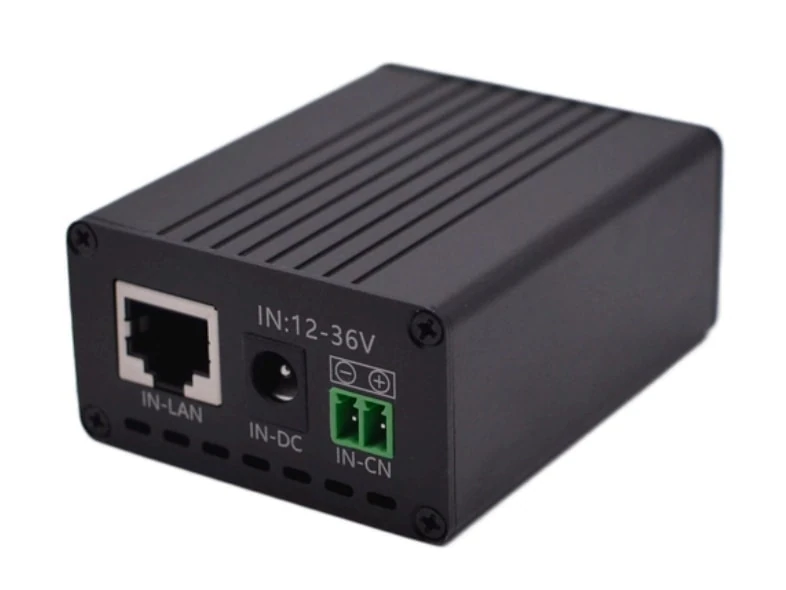
Where a powered device requires PoE rather than direct DC, a converter may be needed. The Maxsol POE24V DC-to-PoE converter accepts 12–36V DC and provides adjustable 12–57V PoE output, Gigabit Ethernet and an LCD voltage display. Its documented continuous load when converting 12V to 48V is no more than 30W.
The stated conversion efficiency of up to 94% is a maximum, not a guaranteed value for every input, output and load condition. Use a conservative loss allowance in the energy budget.
IEEE powered-device detection or negotiation is not established by the supplied facts. Before connection, verify:
- required output voltage;
- maximum continuous and start-up load;
- polarity and PoE pinout;
- passive versus negotiated PoE requirements;
- Ethernet data compatibility;
- grounding arrangement;
- fuse or breaker protection;
- cable voltage drop.
A converter producing the correct voltage can still damage equipment if polarity, pinout or protocol is wrong. Never connect a camera, radio or switch based only on a shared “PoE” label.
The CS12060, POE24V and CPE295 are separate selection examples, not a tested compatible bundle. Compatibility must be demonstrated for the exact supplied versions and connected equipment.
Plan mounting, cabling and protection
Mechanical and cable design often determines whether a remote CCTV system remains serviceable. Plan the layout before fixing the panel, enclosure or cameras.
Separate the functional zones
A practical layout may include:
- cameras positioned for the required field of view;
- solar panel positioned for exposure rather than camera convenience;
- battery and controller housed in a secure, suitable enclosure;
- recorder or local storage protected from tampering;
- radio mounted for path clearance and alignment;
- service loops and labelled isolation points;
- protected cable entries facing away from water paths.
Avoid placing the solar panel where it blocks the camera view or creates a large reflective surface within the image. Allow for seasonal vegetation growth and ensure maintenance access does not disturb camera alignment.
Control cable loss
Long low-voltage DC runs can suffer material voltage drop. Keep high-current battery-side conductors as short as practical, select cable sizes from the actual current and length, and verify voltage at the load during peak operation.
Where Ethernet cabling leaves an enclosure or runs up a mast:
- use cable suitable for the installation environment;
- maintain bend radius and strain relief;
- form drip loops;
- seal cable entries correctly;
- keep connectors out of standing water;
- label both ends;
- test every conductor and link;
- avoid unsupported cable runs.
For enclosure layout, fibre options, battery integration and outdoor switching considerations, see the outdoor PoE switch, power, fibre and battery guide.
Plan electrical and environmental protection
Protection should be designed as a coordinated system rather than added at the end. Depending on the site, this can include:
- correctly rated DC fuses or breakers near energy sources;
- reverse-polarity protection;
- surge protection on external power and data paths;
- appropriate earthing and bonding;
- separation between battery, data and higher-risk conductors;
- enclosure drainage and condensation management;
- corrosion-resistant mounting hardware;
- tamper-resistant fasteners and locks;
- protection from livestock, rodents and vegetation.
Follow applicable electrical, structural, radio and site-safety requirements. If the mast, earthing arrangement or surge exposure is outside the installer’s competence, obtain suitably qualified design input.
Commission night operation and outage recovery
Commissioning must prove that the whole system works under realistic conditions. A daytime live view and a charging indicator are not sufficient acceptance evidence.
Test the surveillance function
For each camera:
- Capture a reference image from the final mounted position.
- Confirm the required target area and image detail.
- Check focus, exposure and motion performance.
- Repeat the test after dark.
- Look for infrared reflection from nearby surfaces, insects, rain covers or enclosure windows.
- Confirm time stamps and time synchronisation.
- Retrieve and export a recorded clip.
Night testing is especially important because camera consumption, image quality and motion behaviour may all change when infrared illumination or other night functions activate.
Test recording and backhaul separately
Disconnect the external wireless or cellular connection while leaving the local CCTV network powered. Confirm that:
- local recording continues;
- events are stored correctly;
- the recorder does not repeatedly restart;
- the backhaul failure is logged or reported as intended;
- recorded footage remains searchable;
- remote access returns after reconnection.
Then test the opposite condition where practical: interrupt recorder or local-network power and verify orderly recovery. Check that cameras, switches, converters, radios and recorders restart in a workable sequence rather than remaining offline until manually reset.
Verify low-voltage and outage recovery
A controlled test should establish the expected behaviour when available battery energy falls below operating limits. Do not deliberately damage or deeply discharge the battery. Use the controller’s documented procedures and safe test methods.
Confirm:
- which device switches off first;
- whether shutdown causes corrupted recordings;
- the controller’s low-voltage behaviour;
- whether loads restart automatically after charging resumes;
- whether rapid on-off cycling occurs near a threshold;
- whether communications recover without on-site intervention;
- whether clocks and configurations are retained.
A claimed autonomy period should not be accepted solely from nominal watt-hours. If the project requires proof of runtime, define a controlled acceptance test with known loads, initial battery state, environmental conditions and pass criteria.
Record acceptance evidence
A useful handover package includes:
- final camera views in daylight and darkness;
- equipment schedule and model identifiers;
- configured camera and recording settings;
- measured operating voltage at critical points;
- observed current or power under representative operation;
- wireless signal and throughput test results, where applicable;
- cellular service test results, where applicable;
- storage retention and export test;
- backhaul-disconnection test;
- power-loss and restart test;
- cable labels and enclosure photographs;
- system diagram, IP addresses and maintenance instructions;
- unresolved limitations and agreed exclusions.
Measurements should be labelled with the conditions under which they were taken. A single sunny-day charging result does not demonstrate winter autonomy, and one successful wireless speed test does not guarantee permanent application throughput.
Before procurement, compare the linked Maxsol models with the project’s actual port count, maximum load, link path, operating voltage, installation environment and management requirements. Verify current datasheets and interface details for every component before treating them as a complete system.