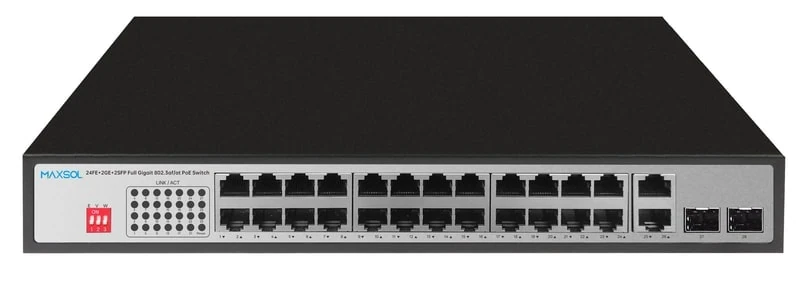
Choosing a PoE Switch for IP Camera Systems in NZ
Choose a PoE switch for IP camera systems by matching camera load, ports, uplinks, cable distance and growth plans before installation.
By Maxsol Team

A suitable PoE switch for IP camera systems has enough powered ports for every camera, a PoE power budget above the cameras’ combined peak demand, and uplinks that suit the recording and network topology. It should also leave sensible room for additions rather than operating at its port or power limit from day one.
For most New Zealand surveillance installations, start by mapping cameras and cable runs, then calculate the load from the camera data sheets. Only after that should you compare switch sizes, copper or fibre uplinks, extended-distance requirements, and features such as VLAN isolation or PoE watchdog recovery.
Start with camera count and topology
Count every device that will receive power from the switch, not only fixed cameras. This may include PTZ cameras, intercoms, wireless bridges, access points or other PoE-powered equipment sharing the surveillance cabinet. Each powered device needs a PoE port; network-only devices do not.
Then draw the physical topology. A simple system may place the recorder, switch and all cameras in one communications cabinet. Larger premises commonly use an access switch in a building, warehouse area, gatehouse or equipment enclosure, with an uplink back to the recorder, core network or another switch.
Consider these questions before selecting a port count:
- How many cameras are being installed now?
- Are any cameras dual-lens, PTZ, heated, illuminated or otherwise higher-power devices?
- Will a wireless bridge, intercom or access point share the same PoE switch?
- Are cameras distributed across separate buildings or outdoor cabinets?
- How many spare ports are needed for planned growth, replacements and fault isolation?
- Is the NVR connected directly to the switch, or is traffic passing through a wider LAN?
A switch with exactly the same number of PoE ports as cameras can work, but it leaves little flexibility. As a practical design approach, choose a port count that accommodates the present camera schedule plus a reasonable allowance for additional cameras or other powered devices. The right allowance depends on site plans, available cabinet space and whether another switch can be added later.
Avoid counting only camera channels on the NVR
NVR channel count and PoE switch port count solve different problems. A 16-channel recorder does not automatically require a 16-port switch, and a 24-port PoE switch does not make a system a 24-camera system. Camera licences, recording capacity, storage retention, network design and PoE power all need separate checks.
Also identify where traffic concentrates. If many cameras feed one access switch, its uplink must carry the combined video traffic towards the NVR or core network. The number of camera ports alone does not determine whether an uplink is adequate.
Calculate the PoE load
The PoE budget is the total power a switch can allocate across its PoE ports. It matters as much as the number of ports. A switch may physically connect 16 cameras but be unsuitable if their combined peak power demand exceeds the available PoE capacity.
Use this process:
- List every powered device on the switch.
- Record the maximum power requirement from each device’s data sheet, including accessories where relevant.
- Add the maximum figures together.
- Allow a design margin for camera start-up behaviour, infrared lighting, PTZ movement, future additions and normal variation in operating conditions.
- Compare the total with the switch’s stated PoE budget or power allocation specification.
Use maximum expected demand for the design calculation, rather than a camera’s typical daytime draw. Cameras can use materially more power at night when IR illumination activates, when white light is enabled, or when a PTZ motor is moving. The actual load also depends on the camera configuration.
For example, a group of low-power fixed cameras and a few higher-demand cameras should be assessed as a mixed load. Do not assume every port has the same demand, and do not estimate a camera’s power draw from its image resolution alone.
Check the camera PoE requirement, not just its connector
An RJ45 Ethernet port does not by itself confirm PoE compatibility. Confirm the camera’s required PoE standard, maximum input power, connector type and any manufacturer-specific power requirements. Cameras with heaters, wipers, high-output illuminators or external accessories can need more power than standard indoor fixed cameras.
For each switch, also verify:
- Its stated total PoE budget or available PoE output
- Maximum power available per PoE port, where specified
- Whether all required ports can supply power simultaneously
- The appropriate PoE standard for the connected equipment
- AC supply, battery backup and site power design
- Operating environment and enclosure requirements
A power budget is not a reason to fill every switch port without checking the calculation. Keep capacity in reserve, particularly where camera operating modes vary after dark.
Choose copper and SFP uplinks
Uplinks carry aggregate camera traffic away from the PoE switch. They may connect to an NVR, router, core switch, adjacent network cabinet or fibre backbone. The correct uplink arrangement depends on both the cable route and the amount of video traffic that will share it.
Gigabit RJ45 uplinks are useful where the upstream device is nearby and connected over structured copper cabling. They can simplify a compact cabinet layout and suit standard Ethernet runs within the usual channel-distance limits.
SFP uplinks are useful when the upstream connection needs fibre. Fibre can be appropriate for longer building-to-building runs, electrically noisy locations, or links where electrical separation is desirable. The SFP module type, fibre type, connector, optical distance rating and compatibility with the far-end equipment all need confirmation as part of the link design.
Do not treat an SFP port as a complete fibre solution on its own. It is an interface for an appropriate module, and the installed module must match the fibre infrastructure and the device at the other end.
Size uplinks for real video traffic
Camera bitrate changes with resolution, frame rate, compression, scene complexity, low-light conditions and camera settings. A fixed bitrate calculation based only on camera count can understate demand. Include live viewing, playback, exports, remote users and other traffic that will share the same connection.
Where possible, segregate surveillance traffic from general office or tenant traffic through the network design. This can improve troubleshooting and reduce the chance that unrelated traffic affects recording or viewing. The right method depends on the wider network, including whether managed switching and VLAN configuration are required.
Decide whether 300m Extend mode is needed
Standard Ethernet copper channel design is normally based on a 100-metre maximum channel. A camera beyond that point needs a different design approach: reposition the switch, install an intermediate network solution, use fibre, or consider a switch’s dedicated extended-distance mode where suitable.
A 300m Extend mode can be useful for remote cameras on long perimeter routes, driveway entrances, rural gates or outbuildings where moving the network cabinet is impractical. However, extended-distance operation should not be selected by distance alone.
Before relying on Extend mode, confirm:
- The switch specifically supports the required distance mode
- The camera’s actual location and full cable path length
- Cable type, conductor quality, installation condition and termination quality
- The available data rate in Extend mode
- Whether that data rate supports the camera stream and any additional traffic
- The camera’s peak power demand at the end of the run
- Surge protection, earthing and outdoor cabling design where applicable
Long cable runs can make poor cabling, marginal terminations and power loss more consequential. Test the complete run after installation, including live video, night mode and any PTZ operation.
The Maxsol PS1802G is specified with 300m Extend mode. Its mode should be considered for a suitable long-run design only after checking the operational data-rate requirement and the full end-to-end cable installation. The PS11602G is also specified with Extend mode; confirm its mode parameters against the planned cable run and camera requirements before selection.
For sites with multiple long runs or inter-building links, fibre and locally powered access switching may be a more robust topology than extending copper to every remote endpoint. The best answer is site-specific.
Compare the approved 8, 16, 24 and 48-port models
The following comparison is limited to the stated product information. It helps narrow the shortlist, but it does not replace checking camera requirements, available PoE capacity, uplink design, installation environment and management needs.
| Model | Gigabit PoE ports | Uplinks | Stated power information | Notable stated features | Best considered for |
|---|---|---|---|---|---|
| PS1802G | 8 | 2 Gigabit RJ45 | 120W PoE budget | 300m Extend mode, VLAN isolation, AI PoE watchdog | Smaller camera groups and compact edge installations |
| PS11602G | 16 | 2 Gigabit | 300W internal power supply | Watchdog, VLAN and Extend modes | Mid-sized systems where 16 powered ports suit the camera plan |
| PS12402FG | 24 | 2 Gigabit RJ45 and 2 Gigabit SFP | 300W PoE budget; up to 30W per PoE port | Copper and fibre uplink flexibility | Larger access layers requiring fibre uplink options |
| PS14802SFG | 48 | 2 Gigabit SFP | 400W PoE budget | 100Gbps switching capacity | Higher-density camera deployments with fibre uplink requirements |
When an 8-port switch is a logical fit
The PS1802G 8-port Gigabit PoE switch with 120W budget suits installations with up to eight PoE-powered endpoints where the calculated load remains within its 120W budget. Its two Gigabit RJ45 uplinks can suit a copper-connected recorder or upstream switch.
Its stated 300m Extend mode, VLAN isolation and AI PoE watchdog are relevant considerations for compact surveillance deployments, especially where camera isolation or long cable runs are part of the design. Confirm whether the available ports and power allowance leave enough room for expansion.
When to move to 16 ports
The PS11602G 16-port Gigabit PoE switch provides 16 Gigabit PoE ports and two Gigabit uplinks. It has a stated 300W internal power supply and includes watchdog, VLAN and Extend modes.
This port class can make sense for a moderate camera schedule that would leave an 8-port model too constrained. Before specifying it, confirm the available PoE allocation for the actual camera schedule, along with the maximum per-port requirement of higher-power cameras.
When copper and fibre uplinks are both needed
The PS12402FG 24-port Gigabit PoE switch with RJ45 and SFP uplinks has 24 Gigabit PoE ports, two Gigabit RJ45 uplinks and two Gigabit SFP uplinks. It has a 300W PoE budget and supports up to 30W per PoE port.
This configuration can suit a 24-device access layer where an installer needs the choice of local copper uplinking and fibre connectivity. The 30W-per-port figure does not mean that all 24 ports can necessarily be loaded to 30W at once: the total 300W budget still governs the overall design.
When a 48-port access layer is appropriate
The PS14802SFG 48-port Gigabit PoE switch with SFP uplinks has 48 Gigabit PoE ports, two Gigabit SFP uplinks, a 400W PoE budget and 100Gbps switching capacity.
A 48-port switch is most appropriate where camera density, cabinet design and the power calculation justify consolidation. It is not automatically the best choice for a distributed site. Multiple smaller switches can sometimes reduce copper run lengths, simplify fault boundaries and place capacity closer to cameras. Compare both approaches against maintenance access, power backup design, fibre availability and future expansion.
Management, isolation and recovery needs
A surveillance network may need more than basic connectivity. Decide early whether the site needs configurable VLANs, monitoring, remote fault diagnosis, port-level controls or integration with an existing managed network.
VLAN isolation can be useful where surveillance devices should be separated from other network users or equipment. However, an isolated camera network still needs correctly planned paths to the NVR, viewing workstations and any authorised remote-access services. Poorly planned segmentation can prevent cameras from being discovered or recorded.
A PoE watchdog feature may help with recovery planning for connected powered devices. It should not substitute for diagnosing recurring faults caused by cable damage, unstable power, incorrect camera configuration or network loops. Establish a documented commissioning process so support staff know the intended port assignments, addressing and uplink paths.
Check whether configuration needs are met by the selected switch itself or by upstream network equipment. Avoid assuming that a feature labelled “VLAN” provides every managed-switch function needed for complex enterprise designs.
Final deployment checklist
Use this checklist before ordering and again during commissioning.
Camera and port planning
- List every camera and other PoE-powered endpoint.
- Include spare capacity for foreseeable expansion.
- Confirm each camera’s PoE standard and maximum power requirement.
- Identify high-demand devices such as PTZ or illuminated cameras.
- Confirm the NVR’s channel, recording and storage design independently of switch port count.
PoE power planning
- Add the maximum demand of all devices connected to each switch.
- Include a practical margin for night operation, accessory loads and growth.
- Check total PoE budget and any stated per-port limit.
- Confirm the site’s AC supply and backup-power approach.
- Test simultaneous camera operation, including night functions, after installation.
Network and uplink planning
- Map each uplink destination: NVR, core switch, router or fibre backbone.
- Estimate aggregate video traffic rather than relying on camera count alone.
- Select RJ45 or SFP uplinks based on cable route and infrastructure.
- Confirm SFP modules and fibre specifications at both ends where fibre is used.
- Plan surveillance traffic isolation and authorised access paths.
Cabling and distance checks
- Measure the actual cable path, not the straight-line distance.
- Keep standard copper Ethernet runs within the relevant channel limits.
- Use Extend mode only after confirming distance, data rate, cable quality and camera load.
- Review outdoor cable routing, surge protection and earthing requirements.
- Label camera cables, switch ports and uplinks for maintenance.
Commissioning checks
- Verify that every camera receives stable power and records correctly.
- Test live viewing, playback and remote viewing where required.
- Test low-light, IR, white-light and PTZ functions where fitted.
- Confirm uplink operation under expected camera traffic.
- Record switch configuration, port assignments and spare capacity.
The best PoE switch for IP camera systems is the one that matches the installed camera schedule, peak power load, cable distances and uplink topology while retaining room for change. Compare the linked Maxsol models against your required port count, calculated load, distance, power design, environment and management requirements before making a final selection.