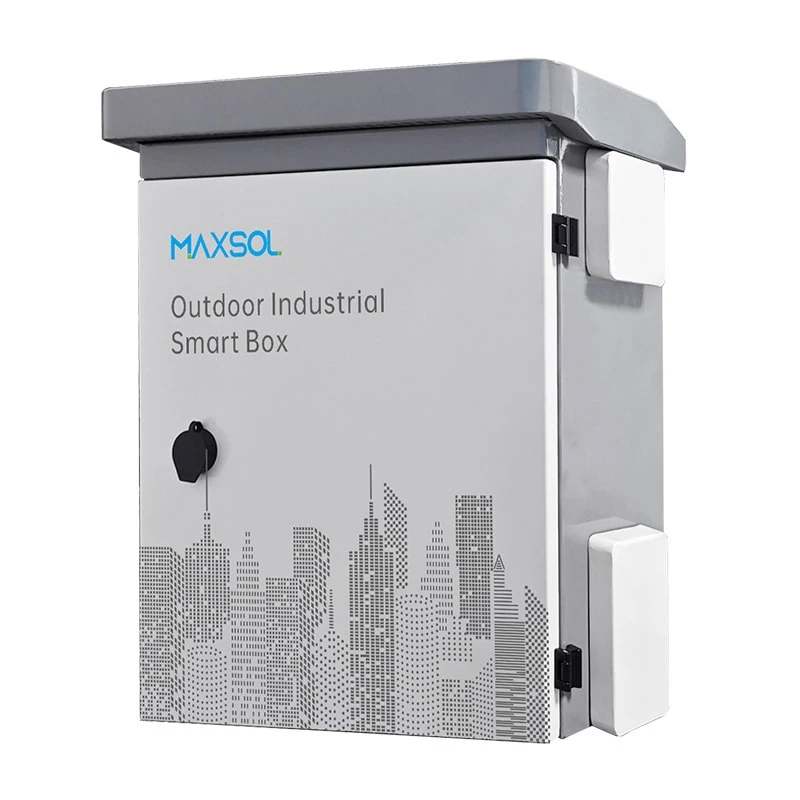
IP65 and IK10 CCTV Enclosures: NZ Selection Guide
Learn what IP65 and IK10 ratings cover, then select an outdoor CCTV enclosure by size, material, mounting, cable entry and maintenance needs.
By Maxsol Team

An IP65 IK10 outdoor CCTV enclosure addresses two separate risks: IP65 concerns dust and water ingress, while IK10 concerns mechanical impact. Neither rating alone confirms that the enclosure will suit your camera, PoE switch, power supply, battery, cable layout or mounting location.
For an outdoor CCTV installation in New Zealand, start with the site conditions and the equipment that must fit inside. Then confirm usable internal space, cable-entry design, material, mounting method, heat management and earthing requirements. The enclosure rating is important, but it is only one part of a reliable installation.
IP and IK ratings answer different questions
IP and IK ratings are often shown together on outdoor smart boxes, but they do not measure the same thing.
An IP rating describes protection against ingress: solid objects such as dust, followed by water. In IP65:
- The first digit, 6, means the enclosure is dust-tight.
- The second digit, 5, means it is protected against water jets from any direction.
An IP65 enclosure is therefore a sensible starting point for exposed outdoor equipment where wind-blown dust, rain and wash-down-style water exposure may occur. However, IP65 does not mean the enclosure is suitable for submersion, prolonged standing water or every high-pressure cleaning condition.
An IK rating describes the enclosure’s resistance to mechanical impact. IK10 is a high impact-resistance classification, based on an impact energy of 20 joules under the applicable test method. It is relevant where equipment may be knocked by tools, trolleys, sporting equipment, vandalism or accidental contact at accessible sites.
| Rating | What it addresses | What it does not establish on its own |
|---|---|---|
| IP65 | Dust ingress and water jets | Immersion protection, internal condensation control, cable-gland suitability or corrosion resistance |
| IK10 | Resistance to a defined mechanical impact level | Water ingress, resistance to prying, lock security or suitability of the mounting surface |
| IP65 IK10 | Both environmental ingress and impact risks | Whether the installed system has enough space, cooling, power capacity or correct earthing |
The key point is simple: an enclosure can be IP65 without being IK10, or IK10 without being IP65. Specify both where both exposure types matter.
Also consider the complete installed assembly. An enclosure body may carry a rating, but poorly fitted glands, unused open knockouts, an incorrectly seated door seal or a cable that prevents the door from closing properly can compromise the finished installation.
Measure the equipment and cable space
External dimensions are useful for comparing enclosure options, but your design must fit within the usable internal volume after allowing for door clearance, backplate hardware, cable bend radius and airflow.
Make an equipment layout before choosing the box. Include every item that will live inside it, not just the CCTV recorder or network switch.
Typical contents may include:
- An industrial PoE switch or Ethernet switch
- Fibre termination or media-conversion equipment
- DC power supplies, fuses and surge-protection devices
- A battery and charging equipment for a solar-powered location
- Terminal blocks, DIN rail, cable management and earthing hardware
- Wireless bridge equipment or control components
- Service slack for copper, fibre or power cables
Allow for real installation clearances
A box that physically contains the equipment may still be impractical to install or service. Leave room for:
- Cable bend radius: Network and fibre cables must not be forced into sharp turns near a gland or terminal.
- Connector access: Allow enough hand space to insert and remove RJ45 plugs, fibre connectors or DC terminals.
- Door clearance: Confirm that door-mounted components do not foul equipment mounted on the backplate.
- Power separation: Keep mains, extra-low-voltage DC and data wiring arranged in accordance with the design and applicable installation requirements.
- Future changes: A spare DIN rail section, cable route or gland position can avoid an enclosure replacement when one camera or network link is added later.
As documented examples, the IB542 IP65 IK10 industrial outdoor smart box measures 500 × 400 × 200 mm. The 200 mm depth may suit compact network and power arrangements where equipment protrusion and cable routing have been carefully checked.
The IB552 IP65 IK10 industrial outdoor smart box measures 550 × 450 × 280 mm. Its larger dimensions can provide additional layout room, but the right selection still depends on the actual internal arrangement, mounting hardware and required maintenance access.
Do not assume that an enclosure’s external dimensions equal its clear internal dimensions. Ask for or measure the internal layout details before finalising equipment placement.
Compare steel and ABS enclosure options
Material selection affects impact resistance, mounting approach, corrosion considerations, weight, thermal behaviour and the way holes or cable entries are prepared. Neither galvanised steel nor ABS is automatically better; the proper choice follows the location and the installed system.
| Consideration | Galvanised steel enclosure | ABS enclosure |
|---|---|---|
| Mechanical robustness | Often chosen where a more rigid metal housing is required | Consider the stated IK classification and local exposure risk |
| Weight | Generally heavier, affecting wall or pole support design | Typically lighter to handle and mount |
| Earthing | Metal enclosure and door bonding should be addressed in the electrical design | The enclosure itself is non-metallic; earthing requirements apply to installed electrical equipment as applicable |
| Cable-entry work | Hole treatment and suitable glands are important to preserve protection and finish | Use appropriate glands and avoid damaging the housing during drilling |
| Heat behaviour | Can transfer heat differently from plastic, while still needing a thermal assessment | Can reduce direct conductive heat transfer, but enclosed equipment still produces heat |
| Outdoor durability | Confirm coating condition and suitability for the specific site environment | Confirm UV and environmental suitability for the actual product and location |
The IB542 and IB552 are made from 1.2 mm galvanised steel with powder coating, and both have documented IP65 and IK10 ratings. That combination may be appropriate when your project calls for a metal enclosure with the stated ingress and impact classifications. Assess the condition of any cut-outs, mounting holes and glands as part of the installed design.
For applications where an ABS housing is preferred, the IP652 ABS distribution box measures 600 × 500 × 220 mm. It has a 4 mm ABS housing, IP65 ingress protection and an IK09 impact rating. Its documented uses include junction, distribution, battery, control and monitoring applications.
The difference between IK09 and IK10 matters if the site has a meaningful impact risk. Do not treat an IP65 IK09 ABS enclosure as identical to an IP65 IK10 steel enclosure simply because both provide the same IP rating.
Consider the environment, not just rain
New Zealand installations can experience driving rain, airborne salt near the coast, fine dust, intense sun and large temperature changes over a day. The rating marks answer defined test questions; they do not replace a site assessment.
For exposed or coastal locations, confirm the suitability of the entire assembly, including powder coating condition, fasteners, hinges, glands, mounting brackets and cable sheath. If you drill the enclosure, use a method that maintains a sound sealing surface and protects exposed material appropriately.
Plan wall or pole mounting
Mounting affects enclosure life, accessibility, security and water management. A rated enclosure needs a mounting arrangement that can safely support its combined weight once all networking, power and battery equipment has been installed.
The IB542 and IB552 both support wall or pole mounting. Select the method based on the site structure, available working space and cable route rather than treating mounting as an afterthought.
Wall mounting considerations
Wall mounting can make cable routes shorter and simplify servicing where there is a suitable structural surface. Before installation:
- Confirm the wall substrate, fasteners and load capacity.
- Maintain clear access to the door, locks and cable entries.
- Avoid placing the enclosure where water flows directly from a roof edge or gutter.
- Keep it clear of vehicle paths, gates and areas where it may be struck.
- Plan a mounting height that balances security with safe service access.
- Check whether door opening direction leaves adequate working space.
Do not mount a loaded enclosure only to cladding, thin sheet material or an unsuitable backboard without verifying the support arrangement.
Pole mounting considerations
Pole mounting can be useful for perimeter cameras, car parks, gateways and sites where equipment needs to sit near the camera or wireless link. However, it adds design questions:
- Is the pole structurally adequate for the enclosure and wind exposure?
- Does the mounting hardware suit the pole diameter and shape?
- Will the enclosure remain stable rather than twisting or vibrating?
- Can the door be opened safely after it is mounted?
- Is there clearance for cable loops, glands and bend radius?
- Is the location protected from mowing equipment, vehicles or casual impact?
Place cable entries and drip loops so water does not track along a cable directly into a gland. A downward-facing entry can help with water management, but it still needs the correct gland type, tightening and cable diameter.
Cable entry, grounding, cooling and maintenance
A CCTV enclosure is only as reliable as the details around its openings, connections and internal conditions. These are frequent causes of faults even when the enclosure itself has an appropriate IP and IK rating.
Choose cable entries as part of the enclosure design
List the cables before drilling or selecting gland positions:
- AC supply cable, where applicable
- DC output cables
- PoE Ethernet runs
- Fibre optic cables
- Camera tails and alarm cables
- Antenna or wireless-bridge leads
- Earth or bonding conductors where required
Use cable glands sized for the actual cable outside diameter, and fit blanking plugs to every unused opening. A gland that is too large, too loose or incorrectly tightened can undermine the ingress protection of the assembled box.
Avoid overcrowding the lower edge with entries. It can make glands inaccessible, force tight cable bends and make fault-finding difficult. Where practical, group and label cables by function, while maintaining the segregation required by your electrical and network design.
Ground metal enclosures correctly
A steel enclosure may require protective earthing and bonding as part of the overall electrical installation. This is especially important when AC equipment, metallic cable systems or surge-protection devices are included.
The correct approach depends on the supply arrangement, components used and site requirements. Ensure that:
- Protective earth conductors are correctly terminated where required.
- Door bonding is considered when electrical continuity is necessary.
- Earth paths are not compromised by paint, corrosion or loose hardware.
- Surge protection is designed as a coordinated system, not added as an isolated component.
- Electrical work is undertaken and checked to the applicable New Zealand requirements.
Do not use the enclosure body as a substitute for a properly designed protective-earth arrangement.
Plan for heat and condensation separately
IP65 reduces ingress of external dust and water, but it does not prevent internally generated heat. A PoE switch supplying cameras, an AC/DC power supply, battery charging equipment and solar control hardware can all add heat to a sealed enclosure.
Assess the anticipated heat load, ambient temperature, direct sun exposure and available internal space. Problems to avoid include:
- Equipment operating continuously at the top of its stated temperature range
- A crowded box with no practical air movement around heat-producing devices
- Direct afternoon sun on a dark enclosure
- Heat from a power supply affecting nearby network hardware
- Moisture cycling and condensation caused by temperature changes
Any ventilation, breather, heater or cooling solution must be selected carefully because it can affect ingress protection. Confirm the rating of the completed enclosure assembly rather than assuming the original IP65 marking still applies after modification.
Make maintenance easy
A well-organised enclosure shortens troubleshooting time and reduces the chance of seal damage during service. Good practice includes:
- Labelling cables, fuses, ports and power supplies
- Keeping an updated wiring diagram or port schedule
- Leaving service loops that do not block the door or drainage path
- Checking door seals, hinges, locks and glands during scheduled inspections
- Looking for corrosion, cracked glands, loose fasteners and water marks
- Re-tightening only in accordance with component instructions, rather than overtightening glands or screws
A common mistake is treating an outdoor enclosure as fit-and-forget. Outdoor conditions and repeated service access can change the protection provided by seals and cable entries over time.
Selection checklist
Use this checklist before specifying an IP65 IK10 outdoor CCTV enclosure.
Protection and site risk
- Is IP65 appropriate for the expected dust and water exposure?
- Is IK10 necessary because the enclosure is accessible or exposed to accidental impact?
- Is immersion protection required instead? If so, IP65 is not the right criterion.
- Are there coastal, high-UV, dusty or high-temperature conditions requiring further material and installation assessment?
Equipment fit
- Have you listed every installed component, including terminals, surge protection and cable management?
- Have you allowed for internal mounting hardware, plug access and door clearance?
- Is the enclosure deep enough for cable bend radius and equipment protrusion?
- Is there space for future additions or replacement equipment?
Material and mounting
- Does the steel or ABS option suit the site’s impact, weight and environmental requirements?
- Can the wall, pole and mounting hardware support the fully loaded enclosure?
- Is the installation position safe to access and protected from likely collision points?
- Will the enclosure door open fully after mounting?
Cabling and power
- Are all cable glands matched to the actual cable diameters and environmental exposure?
- Are unused entries properly sealed?
- Is the planned cable route arranged to minimise water tracking and mechanical strain?
- Have earthing, bonding, surge protection and electrical segregation been addressed where applicable?
Thermal management and servicing
- Has the expected internal heat load been assessed?
- Is the enclosure exposed to sustained direct sun?
- Can the equipment be inspected and replaced without disturbing every cable?
- Is there a maintenance plan for seals, glands, fasteners and internal connections?
FAQ
Is IP65 good enough for outdoor CCTV equipment?
IP65 can be suitable for many outdoor CCTV equipment installations because it is dust-tight and protected against water jets. It is not a universal outdoor guarantee. Check the expected exposure, including standing water, direct weather, coastal conditions, sunlight, cable-entry design and any modifications to the enclosure.
Does IK10 mean an enclosure is vandal-proof?
IK10 indicates resistance to a defined mechanical impact level. It does not, by itself, establish resistance to forced opening, tampering with locks, removal from a mounting surface or attack using every possible tool. Consider physical location, mounting hardware, access control and cable protection as well.
Should I choose a larger CCTV enclosure than I need today?
Usually, some spare space is worthwhile. It supports correct cable bend radius, thermal separation, servicing and modest future expansion. However, do not select a larger enclosure without considering mounting load, available site space, solar exposure and whether a larger surface becomes more exposed to impact or wind.
Can I drill holes into an IP65 enclosure?
You can create cable or mounting holes where the product design permits, but every modification must be managed carefully. Use suitable glands, seals, fasteners and blanking methods, and confirm that the completed assembly retains the protection required for the installation.
For a practical next step, compare the IB542, IB552 and IP652 options against your required port count, equipment load, cable distance, power arrangement, site environment and management requirements before selecting an enclosure.