300m Long-Range PoE for IP Cameras: Planning Guide
Learn when a 300m long-range PoE switch can extend IP camera runs, plus cable, power budget, port and commissioning checks for New Zealand sites.
By Maxsol Team

A long range PoE switch 300m mode can be a practical way to place selected IP cameras beyond the usual 100 m copper Ethernet channel distance without adding a local power supply or intermediate network equipment. It is useful for cameras at gates, long driveways, farm sheds, car parks and perimeter points where a conventional switch-to-camera run is too short.
However, 300 m is a mode capability, not an automatic outcome for every camera, cable or site. Long-range operation commonly involves a reduced Ethernet link rate, while the available power at the camera depends on cable resistance, run length, device demand and the switch’s total power budget. Treat 300 m as a design target to validate during commissioning, rather than a distance guarantee.
Why standard Ethernet distance matters
Structured copper Ethernet is normally designed around a maximum 100 m channel: typically up to 90 m of permanent horizontal cable plus patch leads. Beyond that distance, signal quality can deteriorate enough to cause unstable links, negotiation failures or intermittent packet loss.
For a security installation, those faults may show up as:
- A camera repeatedly disconnecting and reconnecting
- Missing video frames or a low-quality stream
- A camera that powers up but falls offline when infrared lighting activates
- Unreliable PTZ movement or rebooting during higher power demand
- A link that works briefly during installation but fails in wet, hot or cold conditions
PoE adds another consideration: voltage drops along the copper conductors. The longer and thinner the cable, the more resistance it has. A powered device (PD) may therefore receive less power than it would on a shorter run, even if the switch has sufficient total wattage available.
A long-range PoE mode addresses the data-distance issue by changing how the Ethernet connection operates on compatible ports. It does not remove the need for good cable, sensible power planning or an end-to-end test.
For a New Zealand outdoor deployment, also distinguish between the cable path and the switch location. A camera cable may be exposed to UV, wind movement, moisture and electrical surges, while the switch itself may need a suitable enclosure, earthing approach and protected mains supply. Those site design decisions remain important whether the cable run is 30 m or 300 m.
What 300m Extend mode changes
A 300 m Extend mode is intended to support selected long copper runs to devices such as IP cameras. Rather than expecting normal Ethernet performance over a distance beyond the ordinary channel limit, the switch changes the operating mode so a lower-bandwidth connection can travel farther.
This is often well suited to a single surveillance camera. Many fixed cameras do not require high network throughput for ordinary H.264 or H.265 video streams, especially where stream settings are planned appropriately. It may be less suitable where a device needs high sustained bandwidth, such as a camera operating at a very high bitrate, a multi-sensor unit, or a link carrying several devices downstream.
Before enabling long-range mode, establish four things:
- Which ports support the mode. Read the switch labelling and product documentation. Do not assume every PoE and uplink port operates in extend mode.
- The link rate in extend mode. A reduced rate can be appropriate for a camera but may constrain other traffic.
- Whether the endpoint is a single device. Long runs are generally easier to troubleshoot and validate when one switch port feeds one camera.
- The realistic route length. Include the fixed cable, patch leads, service loops and any surge-protection leads in the total path.
Long-range mode changes neither the quality of the cable installation nor the camera’s actual power requirement. It also does not convert a damaged, water-contaminated or poorly terminated cable into a dependable network link.
When 300 m mode is a sensible choice
Consider a long-range PoE switch when the design calls for a single IP camera or similar low-bandwidth PoE endpoint on a cable route that may exceed 100 m but is within the switch’s stated long-range limit. Typical examples include:
- An entry camera at a remote vehicle gate
- A camera on an outer building or workshop
- Perimeter coverage across a large commercial yard
- A camera along a rural access road
- A temporary extension where providing mains power at the far end is impractical
It is not automatically the right solution for every distant endpoint. If the route is longer than the supported distance, requires more bandwidth than the extended link supplies, or is exposed to unusually high surge risk, consider a fibre backbone with local PoE at the far end, or a properly designed point-to-point wireless bridge with local power. The correct choice depends on the site, uptime needs and maintenance access.
Cable and powered-device checks
The physical cable is central to a successful long-run PoE design. Start with solid copper, correctly terminated Ethernet cable in a condition appropriate for the route. Avoid treating conductor size, material and connector quality as minor details at 200–300 m.
Check the cable route before specifying the switch
Use this checklist when assessing a longer camera run:
- Confirm it is copper, not copper-clad aluminium (CCA). CCA cable has greater resistance and is a poor choice for long PoE runs.
- Use a suitable category cable. Category rating alone does not guarantee a successful 300 m run, but sound, solid-copper Cat5e or better cable provides a sensible starting point.
- Inspect the whole path. Include joins, couplers, patch panels, plugs, junction boxes and service loops. Each connection is another potential fault point.
- Keep water out. Use cable and glands suitable for outdoor or buried routes where needed. Moisture entering a connector can create intermittent faults that are difficult to locate.
- Avoid crush and damage. Cable pinched by gates, tied too tightly or damaged by rodents can affect both data and power delivery.
- Separate from interference sources where practical. Keep data cabling away from high-current electrical equipment and follow accepted installation practice for the site.
- Plan protection at building entries. Outdoor copper cabling can create a path for surge energy. Review protection and earthing as a complete system, rather than adding components without a coordinated design.
A cable tester can verify basic continuity and pair mapping, but a simple pass result is not a promise that a long PoE link will carry a camera reliably. The final proof is a stable powered link with the camera operating under its expected load.
Confirm the camera’s data and power needs
Read the camera datasheet and measure actual demand where the project warrants it. A device’s headline PoE class or maximum input power is only part of the picture.
Pay particular attention to:
- Peak consumption when infrared LEDs, a heater, wiper or PTZ motors run
- Whether the camera needs standard PoE, PoE+ or a higher-power PoE input
- Boot-up power demand, which can differ from normal running demand
- Stream bitrate, codec, resolution, frame rate and any analytics workload
- Any additional device connected near the camera, such as an illuminator or radio
An “up to 60 W” port rating does not mean every powered device will consume 60 W, nor does it mean the port can provide that level of power at the far end of every 300 m cable route. The camera must be compatible with the port’s PoE implementation, and the delivered power needs to remain adequate at the installed distance.
Compare 4, 8, 16 and 24-port options
Port count should be based on the number of endpoints now, practical grouping of cable routes, expected expansion and the available upstream connectivity. It is also important to separate PoE access ports, which feed cameras, from uplink ports, which carry traffic back to the recorder, core switch or network.
The following Maxsol models all state a 300 m long-range mode, but differ in access-port quantity, uplink arrangement, total power budget and high-power port allocation.
| Model | PoE access ports | Uplinks | Total PoE budget | Ports specified up to 60 W |
|---|---|---|---|---|
| PS1402E | 4 Fast Ethernet | 2 Fast Ethernet | 65 W | Port 4 |
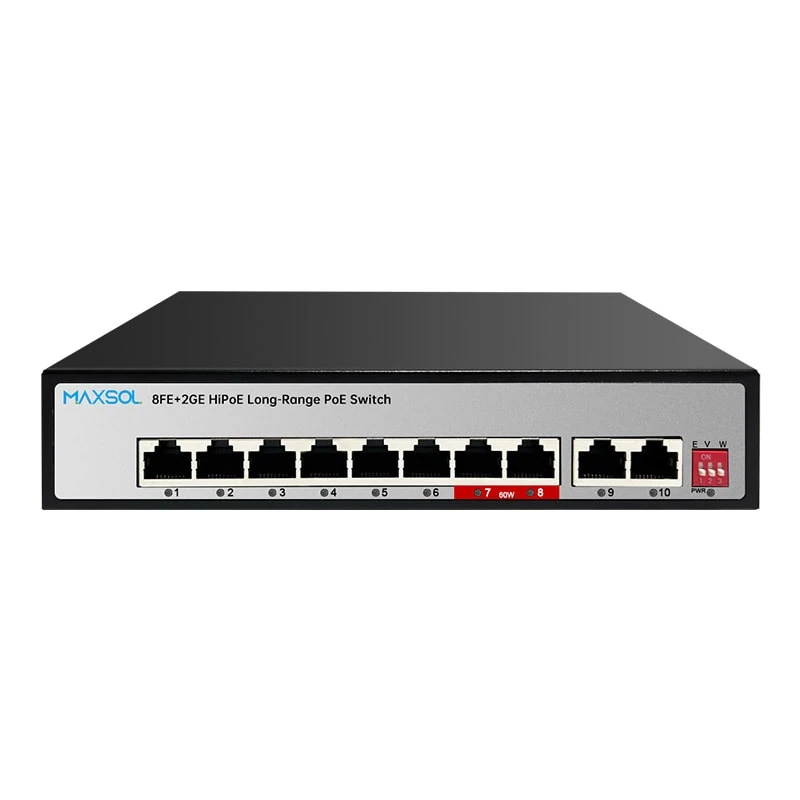
| PS1802GE | 8 Fast Ethernet | 2 Gigabit Ethernet | 120 W | Ports 7–8 |
| PS11602FE | 16 Fast Ethernet | 2 Gigabit Ethernet + 1 SFP | 200 W | Ports 13–16 |
| PS12402FE | 24 Fast Ethernet | 2 Gigabit Ethernet + 1 SFP | 300 W | Ports 20–24 |
Four ports: compact remote camera groups
For a small camera cluster, the PS1402E 4-port long-range PoE switch has four Fast Ethernet PoE ports, two Fast Ethernet uplinks, a 65 W budget and 300 m long-range mode. It also provides VLAN and watchdog functions, with up to 60 W on port 4.
This type of layout can fit a small building, gate area or remote camera group, provided the combined device load remains within 65 W. The Fast Ethernet uplinks should also be considered carefully: calculate the aggregate traffic from all connected cameras rather than focusing only on individual camera bitrates.
Eight ports: more camera capacity with Gigabit uplinks
The PS1802GE 8-port long-range PoE switch supplies eight Fast Ethernet PoE ports, two Gigabit uplinks, a 120 W budget and 300 m long-range mode. Ports 7 and 8 are specified for up to 60 W each.
This is a useful size where several standard cameras are grouped together but the uplink needs more headroom. Gigabit uplinks can help prevent the backhaul becoming the bottleneck, although the actual network design must still account for recording traffic, viewing stations and any other traffic sharing that path.
Sixteen ports: larger edge cabinets and fibre-ready uplinks
The PS11602FE 16-port long-range PoE switch has 16 Fast Ethernet PoE ports, two Gigabit uplinks, one SFP uplink, a 200 W power budget and 300 m long-range mode. Ports 13–16 are specified for up to 60 W.
The combination of Gigabit and SFP uplinks can be relevant where a larger camera group is backhauled to a network cabinet over a suitable fibre link. Confirm the SFP module type, fibre type, link design and all associated compatibility requirements separately; these details are not determined by the switch’s port count.
Twenty-four ports: higher-density camera deployments
The PS12402FE 24-port long-range PoE switch provides 24 Fast Ethernet PoE ports, two Gigabit uplinks, one SFP uplink, a 300 W budget and 300 m long-range mode. Ports 20–24 are specified for up to 60 W.
This option suits a higher number of distributed endpoints when the load calculation supports it. A 300 W total budget is substantial, but it still needs allocating across all cameras. Do not select it on port count alone if multiple high-power cameras, heaters or PTZ units are part of the design.
Hi-PoE port allocation and power budgets
High-power ports should be allocated deliberately. On the listed models, only particular port ranges are stated as supporting up to 60 W:
- PS1402E: port 4
- PS1802GE: ports 7–8
- PS11602FE: ports 13–16
- PS12402FE: ports 20–24
Put an endpoint with a higher declared power requirement on one of those specified ports, then label the connection in the cabinet schedule. This prevents a later technician from moving the camera to an unsuitable port during maintenance or expansion.
Calculate the total, not just each port
The switch’s total PoE budget is shared by all powered ports. A design is viable only if the expected combined load remains below the stated budget with enough operational margin for peak use.
A straightforward planning method is:
- List every powered endpoint connected to the switch.
- Record each device’s maximum or measured operating wattage, including features such as infrared lighting and heating.
- Identify devices that require a designated high-power port.
- Add the loads together.
- Compare the result with the switch’s total budget.
- Retain reasonable headroom rather than designing at the absolute maximum.
For example, a switch with a 120 W budget cannot supply eight devices at 30 W each simultaneously, even though it has eight PoE ports. The ports may be physically available, but the combined demand would be 240 W. Conversely, an eight-camera system with modest fixed-camera loads may require considerably less than 120 W. The calculation must use the actual equipment list.
At long distance, validate power at the camera end during real operation. The switch-side budget is necessary but does not by itself account for voltage loss in the cable. A camera that starts normally may still become unstable after dark when its IR illumination turns on.
Avoid these common allocation mistakes
- Connecting a high-power camera to a non-designated port without checking its requirements
- Treating a 60 W port limit as a 60 W guarantee at the end of any cable length
- Adding up typical consumption only and ignoring peak demand
- Forgetting that replacements and future camera upgrades may draw more power
- Planning every port at full load with no allowance for startup or environmental conditions
- Mixing ordinary and extended-distance runs without documenting which mode each port uses
Commissioning checklist
Commission each extended run as an installed system, not simply as a cable connection. A repeatable checklist helps catch issues before the site is handed over.
- Record the route length. Include patch leads and any sections added after the cable was originally pulled.
- Inspect and test the cable. Confirm pair continuity, termination quality and absence of obvious physical damage.
- Verify the camera model and PoE requirement. Check its expected peak load and intended network settings.
- Use the correct switch port. Allocate higher-power devices to the specified high-power ports where required.
- Enable and verify long-range mode only where needed. Confirm the mode and the resulting link status according to the switch documentation.
- Check negotiated link behaviour. Ensure the actual link rate supports the camera’s configured stream and management traffic.
- Measure or observe power stability. Test the camera through boot-up and its higher-load functions, including night mode, IR, PTZ movement or heating where applicable.
- Review video at the recorder and a viewing client. Look for packet loss symptoms, stream drop-outs, image freezing and excessive latency.
- Test simultaneous demand. Bring all cameras online and exercise peak-load functions where safe and relevant.
- Document the installation. Record port numbers, camera locations, cable routes, power estimates, extend-mode settings and uplink connections.
- Check outdoor protection measures. Confirm cabinet sealing, cable entries, protection devices and earthing arrangements match the site design.
- Recheck after environmental change. Where possible, review long outdoor runs after rain, temperature variation or the first night-time operating cycle.
FAQ
Can every IP camera run 300 m from a PoE switch?
No. The switch mode may support a 300 m long-range connection, but successful operation depends on the camera, cable quality and construction, actual link rate, power demand, connection quality and site conditions. Test the complete installed run.
Does 300 m Extend mode provide normal Gigabit speed to the camera?
Do not assume so. Long-range modes commonly use a reduced link rate to achieve greater distance. Check the relevant switch documentation and ensure the resulting bandwidth is adequate for the camera’s configured video stream.
Can I use a 300 m long-range mode for several cameras on one cable?
A single PoE port normally feeds one endpoint cable. Adding a downstream switch or splitter introduces bandwidth, power and compatibility considerations. Design and verify such arrangements separately rather than assuming long-range mode will support multiple cameras on one extended copper run.
Is a bigger PoE budget always better?
A larger budget allows more total device load, but the correct model also depends on the number of cameras, high-power port positions, uplink needs, cabinet design and expansion plan. An oversized budget does not compensate for poor cable or an unsuitable camera stream configuration.
For the next step, compare the linked Maxsol models against your required port count, camera loads, longest cable route, high-power port needs, uplink design, enclosure environment and any management requirements before finalising the switch selection.