Managed vs Unmanaged PoE Switches: A Practical Guide
Compare managed and unmanaged PoE switches for cameras, wireless links and SMB networks, including VLANs, diagnostics, redundancy and selection checks.
By Maxsol Team

A managed vs unmanaged PoE switch decision comes down to how much visibility and control the network needs after installation. An unmanaged PoE switch is usually suitable for a small, self-contained group of compatible cameras or network devices where the physical layout is simple and faults can be checked on site. A managed PoE switch is the better fit when you need configurable VLANs, remote monitoring, traffic prioritisation, fibre uplinks, resilience features or clearer fault isolation.
Neither option is automatically superior. Management creates useful operational control, but it also requires a sound network design and someone responsible for configuration. For a straightforward camera run at one location, an unmanaged switch can be the more practical choice. For distributed surveillance, wireless backhaul, industrial cabinets or shared business networks, management often reduces the risk of difficult troubleshooting later.
What unmanaged PoE switches provide
An unmanaged Power over Ethernet (PoE) switch combines Ethernet connectivity and device power without needing switch configuration. Connect the uplink, connect suitable powered devices, verify the cable runs and power budget, and the switch forwards traffic according to its built-in behaviour.
This makes unmanaged switches useful where the aim is dependable simplicity rather than network policy control. Common uses include:
- A compact bank of IP cameras connected to a dedicated recorder or surveillance network
- A small office network with a few PoE access points, IP phones or cameras
- A temporary installation where there is no need to retain switch configuration
- A remote cabinet that is physically accessible and has a clearly separated network role
- A dedicated camera segment that does not need to exchange traffic with other local networks
The practical advantages
An unmanaged switch has fewer setup steps. There are no management addresses, user accounts, firmware settings, VLAN tables or monitoring platforms to configure before commissioning. For an installer handling a repeatable, small deployment, this can reduce commissioning time and avoid configuration inconsistency.
It can also be an appropriate choice where the network is intentionally isolated by physical design. For example, eight cameras, one recorder and one dedicated PoE switch may not need multiple logical networks if no other users or devices share that connection.
Some unmanaged models add fixed-function assistance through physical controls. This is different from full network management, but can be useful for specific installations. Functions may include port isolation, extended-distance operating modes or camera watchdog behaviour.
The limitations to accept upfront
The trade-off is a lack of detailed control and insight. An unmanaged switch generally cannot provide a web dashboard or SNMP data for monitoring ports, reviewing traffic counters, setting per-port policies or diagnosing network events remotely.
It also cannot normally create a tailored VLAN design. If you need to keep cameras, staff devices, guest Wi-Fi, building systems and uplinks logically separated across the same switching infrastructure, a managed switch is typically required.
Before selecting an unmanaged model, check:
- The total PoE demand of all connected devices, including peak or start-up demand where relevant
- The power available from the switch and any reserve needed for later additions
- Ethernet cable category, cable condition and route length
- The required uplink type and speed
- Whether the switch’s location is suitable for the installation environment
- Whether a fault can realistically be diagnosed by visiting the site
A switch can power every device and still be the wrong design if its uplink becomes congested, its network is not properly separated, or no one can establish what failed remotely.
What management adds
A managed PoE switch lets the network team configure, observe and maintain the switch rather than treating it as a fixed black box. The exact feature set differs by model, so it is important to confirm the documentation for the specific switch rather than assuming every managed model has the same functions.
In practical terms, management can add the following capabilities.
Configurable network separation
Managed switches can support configurable VLANs. A VLAN allows one physical switching environment to carry separate logical networks. This can help isolate camera traffic from business devices, separate tenant or building-system traffic, or carry distinct services over an uplink.
A useful design might separate:
- Surveillance cameras and recorders
- Internal staff network devices
- Visitor Wi-Fi
- Wireless point-to-point equipment
- Building automation or access-control devices
- Switch management traffic
VLANs are not a replacement for a complete security design, but they provide a structured way to reduce unnecessary traffic between device groups. They must be planned end to end: the switch ports, router or firewall, recorder, wireless bridge and any other managed switches all need compatible VLAN settings.
Port-level visibility and fault finding
When a camera drops offline, the question is not simply whether the switch is powered. You may need to determine whether the issue is PoE delivery, a damaged cable, a network loop, an IP conflict, an uplink fault, a camera fault or a recording-system problem.
A managed switch can provide information that helps narrow the investigation, such as link state and traffic activity. Depending on the model and configured tools, it may also support monitoring through SNMP. This is valuable for sites where a technician cannot reasonably travel out just to confirm whether a port has link.
Management does not eliminate faults, but it gives the installer or network administrator more evidence before arranging a site visit.
Traffic handling for mixed networks
Cameras, access points, office devices and wireless links can compete for bandwidth when they share an uplink. Quality of Service (QoS) features can help apply traffic priorities where a design calls for them. Multicast-aware functions, such as IGMP Snooping, can also be relevant when multicast traffic is present and needs to be forwarded more deliberately.
These features need correct configuration. QoS cannot make an undersized uplink carry unlimited traffic, and IGMP Snooping should not be enabled as a default without understanding the wider network design.
Better support for network growth
A small deployment often grows: two cameras become twelve, a standalone recorder gains remote access, or a site adds Wi-Fi and another cabinet. Choosing management at the point where the network becomes shared or distributed can avoid redesigning the switching layer later.
That said, future-proofing should not mean buying complex hardware without a management plan. If nobody will document the IP address, credentials, VLAN assignment and uplink configuration, those features may create avoidable support risk.
VLAN, monitoring and redundancy questions
The most useful way to choose between managed and unmanaged PoE switching is to ask what must be controlled, observed and kept running. VLAN requirements, remote diagnostics and resilience are often the dividing lines.
Do you need a real VLAN design?
A managed VLAN is configurable and can be designed around the role of each port and uplink. It is appropriate when separate device groups must share infrastructure while remaining logically segregated.
By contrast, some unmanaged switches provide a VLAN isolation mode through a DIP switch. This can be useful for a simple camera arrangement, often limiting communication between selected access ports while retaining access to an uplink. It is not the same as designing multiple tagged VLANs across switches, routers, access points and fibre connections.
Ask these questions:
- Will cameras share a switch or uplink with business, guest or operational devices?
- Must devices in one group be prevented from directly reaching devices in another group?
- Will traffic need to traverse multiple switches, fibre links or wireless bridges?
- Is there a router or firewall capable of routing and applying policy between VLANs?
- Can the configuration be documented and maintained?
If the answer to several of these is yes, use a managed switching design rather than relying on a simple isolation mode.
Is remote monitoring important?
Remote monitoring matters more when a site is spread out, difficult to access or commercially sensitive. It can be particularly useful for rural properties, distributed facilities, outdoor infrastructure and sites with several cabinets.
Consider a managed switch if you need to:
- Check port and uplink status before sending a technician
- Incorporate switch status into a network monitoring system
- Identify whether a failure is localised to one device or affecting an uplink
- Review configuration after network changes
- Manage a group of network devices with consistent standards
SNMP is commonly used by monitoring platforms, but compatibility depends on both the switch’s SNMP support and the monitoring system’s configuration. Confirm the supported version, monitoring requirements and access controls before specification.
What does redundancy mean for this site?
Redundancy has several layers. A switch feature alone does not make a complete network resilient.
Possible failure points include:
- Loss of incoming power
- A failed power supply or backup system
- One damaged Ethernet cable
- A cut fibre uplink
- A failed switch
- A network loop or configuration error
- A single recorder, router or internet connection
For networks with a ring topology, managed resilience protocols may help the network recover from a single path failure when designed correctly. Ethernet Ring Protection Switching (ERPS), for example, is a managed feature intended for compatible ring designs. It should be considered only where the entire ring, connected equipment and configuration support the intended topology.
Do not create a physical loop in an unmanaged network in the hope of gaining redundancy. An uncontrolled loop can cause severe broadcast traffic and disrupt the site. If redundancy is required, document the topology and verify the behaviour of every component in the path.
A quick comparison
| Consideration | Unmanaged PoE switch | Managed PoE switch |
|---|---|---|
| Initial setup | Minimal; usually plug in and test | Requires addressing, configuration and documentation |
| VLANs | May offer fixed isolation modes on some models | Configurable VLAN design across ports and uplinks |
| Remote diagnostics | Limited | Port status and management tools, model dependent |
| Traffic policies | Fixed behaviour | Features such as QoS may be available |
| Network resilience | Usually relies on physical simplicity | May support managed resilience features, model dependent |
| Best fit | Small, dedicated and accessible networks | Shared, expanding, distributed or operationally important networks |
| Ongoing responsibility | Basic physical checks | Configuration, access control, backups and change management |
When a simple camera network can remain unmanaged
A simple camera network can remain unmanaged when it is genuinely self-contained and its risks are understood. The key is not the number of cameras alone; it is the network’s role, topology and service expectations.
An unmanaged setup may be sensible where:
- Cameras connect to one dedicated PoE switch and recorder
- The camera network does not share an uplink with office devices or public Wi-Fi
- There is no requirement for custom VLANs or remote switch monitoring
- All cable runs and device power requirements have been checked
- The location is easy to reach for maintenance
- The network has a simple star layout with no redundant loops
- The installer can test every camera stream and recording path at handover
For example, a small workshop or storage area with a handful of cameras and a local recorder may not benefit enough from switch management to justify the additional configuration work. A clean physical layout, labelled cables, a documented recorder address and sensible spare capacity can be more valuable than unused advanced features.
Situations that usually justify moving beyond unmanaged
Reconsider the design if any of the following apply:
- Cameras must be separated from the organisation’s general network through configured VLANs.
- Several switches, cabinets, buildings or wireless links are involved.
- The installation requires fibre uplinks.
- An operations team needs remote visibility into link or port status.
- The switch connects a mixture of cameras, access points, intercoms and business devices.
- There is a requirement for ring-based network resilience.
- A remote or outdoor site would be expensive to visit for routine fault checks.
- The network will be expanded in stages and needs a documented architecture.
A common mistake is choosing unmanaged switching because the first-stage installation is small, then adding uplinks and device groups without revisiting the architecture. Review the network whenever its physical footprint or operational importance changes.
Compare approved Maxsol examples
The following examples illustrate why a model should be selected by deployment requirements, not simply by whether it is described as managed or unmanaged. Confirm the current product documentation, power requirements, environmental suitability and complete specification before final selection.
| Example | Relevant verified context | Where it may fit | Key selection question |
|---|---|---|---|
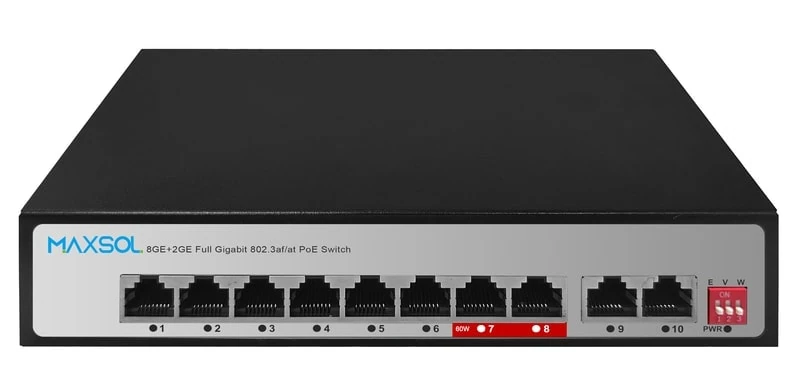
| PS1802G | Unmanaged eight-port Gigabit PoE switch with DIP-selectable Extend, VLAN isolation and AI watchdog modes | A straightforward dedicated camera network where simple mode selection is useful | Is fixed-function isolation sufficient, or do you need configurable VLANs and remote monitoring? |
| PS2802SFG-I-BT | Managed DIN-rail industrial PoE switch with 8GE, 2 SFP, Web and SNMP management, VLAN, QoS, LLDP, IGMP Snooping, ERPS and static routing | A cabinet or industrial-style deployment needing management, fibre connectivity or resilience planning | Will the project use its management and network-control functions, and can they be maintained? |
| SBOX2802SFG-I | Managed smart Ethernet box with 8 Gigabit PoE ports, 2 Gigabit SFP slots, Layer 2 management, IP65 protection and built-in 240W UPS power module | A managed outdoor or protected-box design where the stated enclosure protection and integrated power module are relevant | Does the site design need both managed networking and the specified protected-box/power arrangement? |
For a compact, dedicated camera installation, the PS1802G unmanaged eight-port Gigabit PoE switch is an example of an unmanaged approach with DIP-selectable Extend, VLAN isolation and AI watchdog modes. Treat the isolation mode as a targeted operating function, not as a substitute for a full multi-VLAN architecture.
Where Web and SNMP management, VLANs, QoS, LLDP, IGMP Snooping, ERPS or static routing are central to the design, examine the PS2802SFG-I-BT managed DIN-rail industrial PoE switch. Its two SFP ports are relevant when the network plan calls for compatible fibre connections, but the complete uplink design still needs checking across all connected equipment.
For a deployment that calls for a managed Ethernet box, the SBOX2802SFG-I managed industrial smart Ethernet box combines eight Gigabit PoE ports, two Gigabit SFP slots, Layer 2 management, IP65 protection and a built-in 240W UPS power module. These are product characteristics, not a guarantee that it suits every outdoor site; assess mounting, incoming power, cable entry, temperature exposure, grounding and the wider site power design separately.
Decision checklist
Use this checklist before deciding whether managed PoE switching is worth the additional setup.
Choose an unmanaged PoE switch when
- The switch serves a small, dedicated device group.
- A physical star topology is sufficient.
- No configurable VLANs are needed.
- Remote port monitoring is not required.
- The site is accessible for maintenance.
- The installation team has verified PoE demand, cable lengths and uplink capacity.
- Any isolation or watchdog mode required is available as a fixed function.
- You want the lowest possible configuration overhead.
Choose a managed PoE switch when
- The network needs configurable VLANs across multiple ports or devices.
- Cameras, Wi-Fi, business devices or operational systems share infrastructure.
- You need Web management, SNMP monitoring or clearer remote diagnostics.
- QoS, LLDP or multicast control is required by the network design.
- The project includes fibre uplinks, several cabinets or a distributed layout.
- A correctly designed redundancy approach, such as an ERPS ring, is needed.
- The network is likely to expand and needs consistent documentation.
- Someone can securely manage credentials, configuration backups and future changes.
Confirm these details regardless of switch type
- Port count: Count current powered devices, uplinks and realistic expansion ports separately.
- PoE load: Add the power requirement of each connected powered device and allow a sensible margin. Do not assume the number of ports alone confirms adequate power.
- Distance and cabling: Validate the intended Ethernet distance, cable quality and any use of extended-distance modes against the actual design.
- Uplink capacity: Calculate aggregate camera, wireless or device traffic and check the uplink is not the bottleneck.
- Power continuity: Identify what happens during a mains interruption and which elements need backup power.
- Environment: Match the switch, enclosure, cable routes and power equipment to the installation location.
- Topology: Document every switch, uplink, recorder, router and wireless bridge. Avoid accidental loops.
- Security and access: For managed switches, change default credentials, restrict management access and retain a configuration record.
- Support process: Decide who will diagnose alarms, replace failed equipment and update configuration after changes.
The practical answer is simple: use unmanaged PoE where the network is dedicated, modest and easy to maintain; use managed PoE where separation, visibility, policy control or resilience are real requirements. Compare the linked Maxsol models against your required port count, PoE load, cable distance, uplink type, installation environment and management needs before specifying a switch.