Solar CCTV for Construction Sites: A Practical Plan
Plan solar CCTV for construction sites around camera loads, changing shade, connectivity, secure mounting and recommissioning after relocation.
By Maxsol Team

Solar CCTV can protect temporary construction areas where mains power and fixed data connections are unavailable, but it should be designed as a relocatable system rather than a permanent installation. The key tasks are to calculate the complete day-and-night load, allow for changing shade, select a backhaul that can move with the cameras, and define a repeatable recommissioning process.
For New Zealand construction sites, panel orientation and winter exposure require particular attention. A location that receives good northern sun at the start of a project may later be shaded by scaffolding, site offices, cranes, stored materials or the building itself. Each move therefore needs to be treated as a small redesign, not simply a change of mounting position.
Map temporary surveillance requirements
Begin by defining what the solar CCTV system must observe during each stage of construction. Avoid choosing the solar panel, battery or communications equipment until the surveillance requirement is clear.
Record the following for every planned camera position:
- The area that must be visible, such as an entrance, equipment compound or material storage zone
- Required operating hours
- Whether infrared illumination or other night features will operate
- Camera voltage, peak input power and typical operating power
- Whether the camera requires standard PoE, passive PoE or direct DC
- Recording location: on-camera, on-site recorder or remote platform
- Expected backhaul method
- Mounting height and access method
- Likely dates or project phases for relocation
- Potential shade at different stages of construction
- Theft, tampering and vehicle-impact exposure
A temporary layout should also identify which elements move together. For example, a camera, radio, converter, battery enclosure and solar panel may form one relocatable node. Alternatively, several cameras may connect to a shared powered cabinet. The second arrangement can reduce the number of independent power systems, but it creates a larger common point of failure and may require longer cable runs.
Design around project phases
Construction sites rarely retain the same sightlines. Hoardings move, structures rise, access gates change and secure storage areas shift. A useful surveillance plan therefore shows the expected camera arrangement by phase rather than presenting one final layout.
For each phase, mark:
- Surveillance zones and blind spots
- Solar panel positions and approximate northern exposure
- Cable routes
- Wireless paths or anticipated cellular coverage
- Equipment that will remain fixed
- Nodes scheduled for relocation
- Safe access for maintenance
Build relocation points into the original design. Reusable mounting brackets, labelled cables and documented configuration settings can make later changes more controlled. They do not remove the need to reassess solar exposure, radio performance and camera framing.
Budget camera, radio and night loads
A solar CCTV power budget must include every active device, not just the camera. Radios, converters, switches, infrared illuminators, heaters, recorders and control electronics may operate continuously or add significant night-time demand.
Use watt-hours rather than relying only on equipment wattage:
Daily energy demand (Wh) = device power (W) × operating hours
Calculate each load separately, then account for conversion losses, cable losses, low-temperature performance, controller consumption and a suitable design margin. Do not treat the battery’s nominal watt-hour rating as fully usable delivered energy.
Hypothetical load calculation
The following is a hypothetical design assumption, not measured product performance:
| Component | Assumed load | Assumed operation | Daily energy |
|---|---|---|---|
| Camera during daylight | 7W | 12 hours | 84Wh |
| Camera with night features active | 11W | 12 hours | 132Wh |
| Wireless radio | 6.5W | 24 hours | 156Wh |
| DC conversion and control allowance | 2W | 24 hours | 48Wh |
| Hypothetical total | 420Wh/day |
This example demonstrates why using the camera’s daytime rating alone can substantially understate the load. Actual figures must come from the current datasheets and, where possible, measurements of the intended configuration. Camera power may change when infrared LEDs, motors, analytics or auxiliary equipment operate.
The Maxsol CS12060 120W and 768Wh solar power system is one possible component for evaluation. Its documented configuration includes a 120W monocrystalline panel, 12.8V 60Ah 768Wh LiFePO4 battery, MPPT controller and three DC12V outputs; RS485 is optional. These nominal figures do not establish usable energy, site autonomy or continuous 24/7 operation. Confirm the current controller limits for PV voltage, current and power, as well as battery charging temperatures and protection settings.
Check PoE voltage and protocol compatibility
A solar battery output cannot be assumed to power every PoE camera directly. Check:
- Required powered-device voltage
- Standard PoE versus passive PoE
- Polarity and pinout
- Maximum continuous camera demand
- Start-up or night-mode peaks
- Cable length and conductor size
- Converter input range
- Whether Ethernet data passes at the required rate
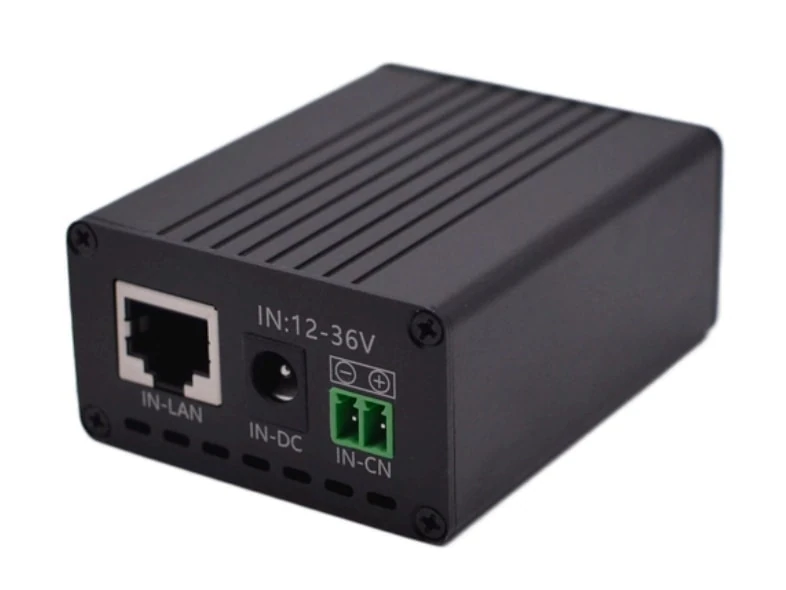
The Maxsol POE24V adjustable DC-to-PoE converter accepts 12–36V DC and provides adjustable 12–57V PoE output, Gigabit Ethernet and an LCD voltage display. Its documented continuous load when converting 12V to 48V is no more than 30W. Up to 94% conversion efficiency is a maximum figure, not a value that should be assumed throughout a power calculation.
IEEE powered-device detection or negotiation is not established by the supplied specifications. Before connecting a camera, verify its voltage, polarity, pinout and protocol requirements. Do not assume that a matching connector means electrical compatibility.
Where several cameras, switches and batteries share an enclosure, use a documented distribution plan. The broader outdoor PoE switch, power, fibre and battery box guide explains the system-level decisions involved without treating the enclosure as an isolated component.
Choose changing-site connectivity
The most suitable backhaul depends on how frequently the system moves, what infrastructure remains available and whether a stable line of sight can be maintained. Construction progress can change both radio paths and cellular signal conditions.
| Factor | Cellular backhaul | Point-to-point or point-to-multipoint wireless |
|---|---|---|
| Site infrastructure | Does not require a local receiving building, but needs suitable network coverage | Requires a receiving endpoint connected to the wider network |
| Relocation | Usually straightforward if coverage remains suitable | Requires realignment and a new line-of-sight check |
| Obstruction risk | Structures may still affect signal quality | Particularly sensitive to buildings, cranes, containers and earthworks entering the path |
| Ongoing service | Requires a suitable mobile service and data arrangement | Service terms depend on the network at the receiving end |
| Traffic planning | Data use must be estimated for live viewing, alerts and uploads | Capacity depends on radio conditions and the rest of the network |
| Fault isolation | Check modem, service, antenna and coverage | Check power, alignment, interference, path clearance and network configuration |
| Best fit | Highly mobile or isolated camera nodes | Sites with a stable network endpoint and clear radio paths |
A cellular connection can simplify deployment where no fixed endpoint is available, but coverage at ground level should be verified at each proposed mounting position. Also determine how video is handled during a service interruption. Local recording may preserve footage, but storage capacity, overwrite behaviour and retrieval procedures still need to be specified.
A directional wireless bridge may suit a site office or another stable building with network access. The Maxsol CPE295 5.8GHz directional wireless CPE documents a 2×2 14dBi directional MIMO antenna, one Gigabit LAN port, IEEE 802.3af/at or 9–48V DC power support, and 6.5W full-load consumption.
Product-range labels or wireless rate descriptions do not guarantee working distance or application throughput. Before selection, verify:
- Clear line of sight throughout the relevant project phase
- Fresnel-zone clearance where applicable
- Expected interference
- Mount rigidity and alignment tolerance
- Network throughput required by the video settings
- Local radio requirements
- Power compatibility
- Performance in the planned topology
A new concrete structure, tower crane, temporary lift, stack of containers or scaffold wrap can interrupt a path that worked during initial commissioning. Include alternative mounting positions or a cellular fallback in the design if loss of the wireless path would leave a critical area unmonitored.
Plan modular mounting and secure enclosures
Temporary does not mean lightly secured. Solar CCTV equipment can be exposed to theft, deliberate tampering, accidental impact, dust, rain, cable damage and unauthorised repositioning.
A modular installation should allow controlled relocation while resisting casual removal. Consider:
- Tamper-resistant fasteners
- Lockable equipment compartments
- Concealed or armoured cable routes where appropriate
- Strain relief and drip loops
- Separate access for routine controls and battery servicing
- Protected cable entries
- Mounts that cannot rotate under wind loading
- Physical separation from vehicle routes
- A visible asset identifier
- An inventory of removable parts and keys
Do not place the panel, camera and directional radio on one flexible pole without checking how wind movement will affect each component. Minor movement may change camera framing and directional radio alignment, even if the panel itself continues to collect energy.
Keep relocation practical
A relocatable node is easier to manage when its connections are standardised and labelled. Mark the camera, radio, power input, PoE output and battery connections. Record voltage settings before disconnection, particularly where an adjustable converter is used.
Useful modular features can include:
- A base that can be lifted or anchored using a defined method
- Separate adjustment for the panel, camera and radio
- Accessible test points
- Replaceable cable sections
- Weather-protected connectors
- A configuration label inside the cabinet
- Enough cable management space to avoid tight bends or crushed leads
The enclosure must be selected for both environmental and impact exposure. Rather than assuming a higher-looking rating solves every problem, consult this practical comparison of IP65 and IK10 outdoor CCTV enclosure considerations. Water and dust ingress protection addresses different risks from mechanical impact resistance, and neither rating alone proves suitability for a particular installation.
Theft planning should cover the recorded evidence as well as the hardware. If all footage is stored inside an easily removed camera, stealing the node may also remove the recording. Remote transmission can reduce that exposure, while local storage can maintain recording during a network outage. Many temporary sites benefit from defining how both methods behave, without assuming either is failure-proof.
Recheck solar exposure after each relocation
Every relocation changes the energy assumptions. A panel moved only a short distance may experience different shade, tilt, wind exposure, cable length or orientation.
In New Zealand, north-facing exposure is generally the starting point for solar planning, but the correct position depends on site geometry and seasonal conditions. Low winter sun can make obstructions more influential than they appeared during a summer survey. Do not rely on a single midday observation.
Complete a new shade assessment whenever:
- A node is relocated
- Another building level is added
- Scaffolding or screening is installed
- A crane or hoist enters the solar path
- Site containers or offices move
- Stockpiles increase in height
- Vegetation or surrounding access changes
- The panel angle is altered
- Energy performance falls unexpectedly
Observe or model the panel location across the relevant part of the day. Early and late shade may be acceptable in some designs, while short midday shading can be more consequential where daily energy margins are already narrow.
Also inspect the panel for construction dust, mud, overspray or bird fouling. A panel can remain in full sun but collect less energy if its surface is obscured. Cleaning procedures must account for working-at-height controls and safe access; do not create an unsafe maintenance task to support the surveillance system.
Recalculate rather than assuming the previous runtime
After a move, repeat the energy balance using the new load and site conditions. Camera settings may have changed, a second radio may have been added, or longer cables may introduce additional loss. Battery state of charge at the time of relocation also matters.
Avoid promising a fixed number of autonomous days from nominal battery capacity. Delivered energy depends on factors including:
- Permitted depth of discharge
- Battery management limits
- Temperature
- Conversion efficiency
- Cable losses
- Battery condition
- Camera behaviour
- Radio traffic
- Available solar input
- Controller configuration
Where winter continuity is important, design against conservative assumptions and define what happens during an extended low-generation period. Options may include reducing non-essential loads, providing an approved charging method, exchanging a charged battery module or moving the node to a better solar position. Any procedure must be compatible with the selected equipment.
Commission and hand over the temporary system
Commissioning should prove that the complete system works in its actual site position. A powered camera on a bench does not confirm solar adequacy, wireless reliability, recording behaviour or useful night coverage.
Use a repeatable commissioning checklist for the initial installation and every relocation.
Power and charging checks
- Confirm panel polarity and controller connections.
- Verify that panel ratings fall within the controller’s current PV limits.
- Confirm the battery type and controller settings.
- Check charging-temperature requirements and protection.
- Measure operating voltage at the source and load where appropriate.
- Activate camera night features and verify peak demand.
- Confirm converter output voltage before attaching the powered device.
- Inspect fuses, cable protection and earthing arrangements required by the design.
- Record the battery state and charging conditions at handover.
Camera and recording checks
- Confirm the field of view against the current site plan.
- Test identification or observation detail at the required locations.
- Check focus, glare and reflections.
- Verify night images with infrared or other illumination active.
- Confirm timestamps and time synchronisation.
- Test local and remote recording behaviour.
- Check retention and overwrite settings.
- Confirm who receives alerts and how false alarms are handled.
Connectivity checks
- Test live video and recorded-video retrieval.
- Check performance at the required video resolution and frame rate.
- Verify wireless alignment and path clearance.
- Confirm cellular performance at the installed position if used.
- Test recovery after a controlled network interruption.
- Record addresses, network settings and authorised access details securely.
- Confirm how the system reports a camera, battery or communications fault.
Physical installation checks
- Tighten and mark mounting fasteners.
- Confirm that the panel, radio and camera cannot shift independently.
- Inspect cable entries, seals, drip loops and strain relief.
- Check that the enclosure is locked.
- Confirm that the node does not obstruct vehicles or site operations.
- Photograph the final orientation for future comparison.
- Record the next planned inspection or relocation phase.
The handover pack should include the temporary layout, equipment schedule, power calculations, voltage and pinout details, network configuration, access-control process, maintenance instructions and recommissioning checklist. It should also identify which assumptions require review when the project moves to its next phase.
Common mistakes to avoid
Several recurring errors can undermine solar CCTV on construction sites:
- Sizing power from the camera’s daytime rating only
- Treating nominal battery watt-hours as fully usable energy
- Assuming a PoE connector establishes voltage and protocol compatibility
- Mounting the panel where future construction will shade it
- Selecting a wireless bridge without checking the later building profile
- Moving a node without retesting night images and backhaul
- Leaving adjustable converter settings undocumented
- Using a light mounting structure that allows radio misalignment
- Storing all footage in equipment exposed to theft
- Failing to define responsibility for panel cleaning and battery checks
- Treating linked components as a confirmed compatible system
The Maxsol products discussed here are selection examples, not a tested compatible bundle. Verify current datasheets, supplied configurations and all interfaces before specifying them together.
A practical next step is to compare the linked Maxsol models with the project’s actual camera and port count, measured day-and-night load, link distance, available solar exposure, environmental risks and management requirements. Then document the checks that must be repeated whenever the temporary surveillance node moves.