Designing Off-Grid PoE CCTV and Wireless Networks
Plan a reliable off-grid PoE camera network with correct voltage matching, solar load priorities, wireless backhaul and restart testing.
By Maxsol Team

An off-grid PoE system for CCTV and wireless networks should be designed as one complete power-and-data chain, not as a solar panel attached to a camera switch. Define which services must remain available, total the simultaneous loads at both ends of the wireless link, match every voltage interface, and test how the network behaves after a low-battery shutdown.
Continuous operation can be a design objective, but it is not guaranteed by nominal battery capacity or PoE budget alone. Winter generation, overnight consumption, conversion losses, temperature, radio conditions and restart behaviour all affect availability. A sound design therefore includes controlled load shedding, remote monitoring and an agreed recovery sequence.
Define network services and availability targets
Start by listing the services the site must provide. “CCTV” is too broad for power planning because live viewing, recording, wireless transport and remote management can have different priorities.
For each service, define:
- whether it must operate continuously or may be shed during low energy conditions;
- whether recording is local, remote or both;
- how much interruption is acceptable;
- whether recovery must be automatic;
- whether a technician can reach the site after a prolonged outage;
- which alarms must remain available when cameras or radios are turned off.
A practical priority model might be:
| Priority | Typical service | Low-energy response |
|---|---|---|
| 1 — essential | Power controller, battery monitoring and critical communications | Keep operating for as long as the protected battery range permits |
| 2 — operational | Wireless backhaul and highest-priority camera | Retain while sufficient energy remains |
| 3 — deferrable | Secondary cameras, illuminators or non-essential network devices | Switch off first |
| 4 — discretionary | Maintenance access points or temporary auxiliary equipment | Enable only when needed |
The exact order depends on the site. For example, preserving a recording camera without its backhaul may still be useful if the camera has separately specified local storage. Conversely, a site that depends entirely on central recording may gain little from keeping cameras powered after the backhaul shuts down.
Availability targets should be measurable. Instead of asking for “24/7 operation”, specify criteria such as:
- all priority-one services operate through the nominated night test;
- lower-priority ports disconnect at defined battery thresholds;
- the network recovers without a site visit after normal power restoration;
- the radio link and cameras reconnect within an accepted period;
- monitoring remains available before non-essential loads restart.
These are acceptance targets, not promises of universal runtime.
Draw the camera, radio and backhaul topology
Draw both the DC power path and the Ethernet path before selecting equipment. A typical remote topology can be described as follows:
- A solar array feeds a compatible charge controller.
- The controller charges a protected battery of the specified chemistry and voltage.
- The battery or controller feeds the network switch through a directly compatible input or a correctly engineered conversion stage.
- The switch powers several IP cameras and the site-side wireless radio.
- The site radio connects over a point-to-point wireless link to a second radio.
- The far-end radio connects to the recorder, router or wider network.
- The far end has its own power source, PoE injector or compatible switch.
That final point is easy to overlook: a wireless bridge needs power at both ends. Powering only the remote camera site does not create an operational backhaul.
Example simultaneous loads
The following is a hypothetical design assumption, not measured product performance or a recommended system size:
| Device at remote site | Quantity | Assumed input per device | Assumed simultaneous load |
|---|---|---|---|
| Fixed IP camera | 4 | 8W | 32W |
| Wireless bridge radio | 1 | 6.5W | 6.5W |
| Future PoE device allowance | 1 | 10W | 10W |
| Total assumed PoE device load | 48.5W |
The switch’s own consumption, cable losses, DC conversion losses, controller load and battery-protection equipment must be added separately. Camera demand may also rise when infrared lighting, heaters, wipers or other functions activate. Use worst-case input values from current device datasheets rather than typical marketing figures.
The example radio load reflects the documented 6.5W full-load consumption of the Maxsol CPE295 5.8GHz wireless CPE. This model documents a 2×2 14dBi directional MIMO antenna, one Gigabit LAN port, IEEE 802.3af/at or 9–48V DC power support. Those specifications do not establish achievable distance or application throughput at a particular New Zealand site.
Plan bandwidth independently of power
Power capacity and network capacity are separate checks. Estimate traffic using the configured bitrate of every simultaneous stream, including:
- main recording streams;
- lower-resolution viewing streams;
- event uploads;
- camera management traffic;
- monitoring and telemetry;
- protocol overhead;
- maintenance access.
Do not size a wireless bridge from its rate label alone. Useful throughput can be reduced by distance, channel width, interference, alignment, obstructions and retransmissions. Confirm clear line of sight, including the Fresnel zone, and allow for vegetation growth and seasonal changes. Installation must also use radio settings and equipment that comply with applicable local requirements.
Where central recording depends on the bridge, test sustained traffic in both directions under realistic conditions. A successful ping is not evidence that the link can carry several camera streams continuously.
Match switch, battery voltage and per-port interfaces
Voltage compatibility must be verified at every boundary. Battery capacity in watt-hours does not make a battery electrically compatible with a switch.
The Maxsol CS12060 120W, 60Ah solar power system documents:
- a 120W monocrystalline panel;
- a 12.8V 60Ah, 768Wh LiFePO4 battery;
- an MPPT controller;
- three DC12V outputs;
- optional RS485.
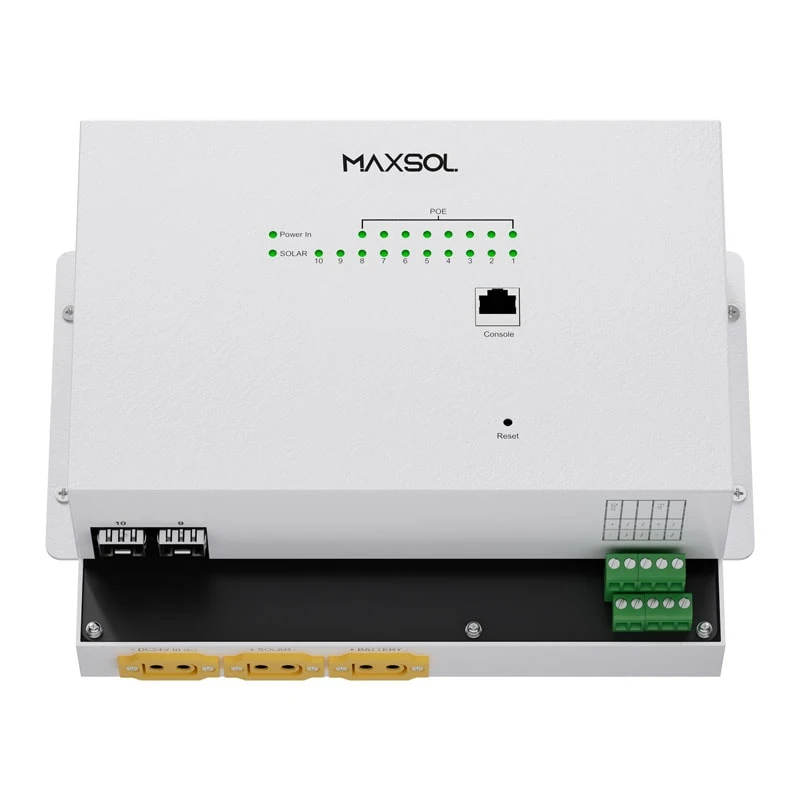
By comparison, the Maxsol IOT2802SFG-S managed solar industrial PoE switch documents PV and battery inputs of DC22–29.2V. It also documents eight Gigabit PoE ports, two SFP ports, a 120W PoE budget, 90W BT support, PV and battery monitoring, and configurable 24V or 48V PoE on ports 3–4.
These linked products are alternative architecture examples, not a tested or validated bundle. In particular, a 12.8V battery or 12V output must not be connected directly to an input requiring DC22–29.2V.
Possible architectures include:
- selecting a battery system whose operating voltage is directly inside the switch’s approved input range;
- using a separately specified DC conversion stage with suitable input range, output regulation, load capacity, protections and environmental rating;
- selecting a switch designed for the available battery voltage;
- using separate solar power systems for different parts of the network where that improves compatibility or resilience.
Do not choose a converter solely from its nominal voltage. Confirm continuous and surge capacity, efficiency across the expected load range, low-voltage behaviour, quiescent consumption, thermal derating and restart characteristics.
Check every PoE interface
For each powered device, record:
- whether it uses IEEE 802.3af, 802.3at or 802.3bt;
- its maximum demand;
- required voltage and pin arrangement where passive PoE is involved;
- whether the switch port performs standards-based detection;
- the cable length and conductor size;
- whether outdoor surge protection introduces additional interfaces.
The documented 120W switch budget is a PoE allocation ceiling, not an assurance that the solar system can supply 120W continuously. Confirm the actual port allocation, charging limits, battery compatibility and supplied configuration. The location and capability of any high-power port should also be verified rather than inferred from the overall 90W BT support statement.
Ports 3–4 are documented as configurable for 24V or 48V PoE. Configuration must match the powered device; the wrong passive voltage can damage equipment. For a CPE295, verify whether the installation will use standards-based 802.3af/at input or its DC input, together with the correct cabling and configuration.
For detailed load arithmetic, use a structured PoE power-budget calculation for security cameras and then extend it to include the switch, radios, conversion losses and non-PoE equipment.
Plan monitoring, load priority and recovery
Remote solar sites need visibility into both power and network status. Without monitoring, a failed camera, shaded panel and weak backhaul can all appear to the operator as the same symptom: the site is offline.
Useful monitoring points include:
- PV voltage and current;
- battery voltage and charging state;
- low-voltage and protection events;
- switch input status;
- PoE port state and consumption where supported;
- radio link quality and negotiated rate;
- camera reachability;
- uplink errors and packet loss;
- enclosure temperature and environmental alarms where separately provided.
The IOT2802SFG-S documents PV and battery monitoring, while RS485 is optional for the CS12060. Confirm which measurements and remote interfaces are included in the actual supplied configuration. Do not assume that monitoring one component provides a complete view of battery state or usable remaining energy.
Use deliberate load shedding
Low-energy behaviour should follow a planned sequence rather than allowing the entire site to collapse at once. One possible policy is:
- Disable discretionary loads.
- Turn off secondary cameras.
- Preserve the backhaul and priority camera.
- Preserve monitoring until the battery protection threshold is reached.
- Shut down remaining loads cleanly before unstable voltage causes repeated restarts.
Repeated brownout cycling can be more disruptive than a controlled shutdown. Cameras and radios may begin booting, pull additional current, collapse the supply and restart indefinitely.
A managed switch can help with port control, status visibility and staged restoration, but the available functions vary by model and configuration. The practical differences are covered in this guide to managed versus unmanaged PoE switches.
Recovery rules are just as important as shutdown rules. Define:
- the battery or controller condition required before restart;
- a delay that allows charging to stabilise;
- which port starts first;
- the interval between radio and camera activation;
- the number of failed restart attempts before equipment remains off;
- how an operator can intervene remotely.
Starting the backhaul before all cameras can restore management visibility while limiting the initial surge. Whether that sequence is appropriate must be verified with the actual devices and operational priorities.
Validate night operation and restart behaviour
Nominal battery capacity is not usable delivered energy. Protection reserves, allowed depth of discharge, temperature, battery condition, converter efficiency and cable loss all reduce what reaches the network. No single panel-and-battery rating establishes year-round 24/7 operation.
For New Zealand projects, design inputs should reflect the actual site rather than a national annual average. Terrain, winter solar access, panel angle, nearby trees, coastal exposure, dust, snow risk and maintenance frequency can materially affect performance.
Run a structured commissioning sequence
-
Verify the design documents. Confirm current datasheets, battery chemistry, voltage ranges, controller PV limits, charging current, charging-temperature restrictions and protective functions.
-
Bench-test the power chain. Test the controller, battery, any conversion equipment and switch together before field installation. Confirm polarity, grounding approach, fusing and expected voltage at each interface.
-
Load all intended ports simultaneously. Activate night-mode camera functions and any other peak-demand features. Check voltage at the switch and at the furthest powered device.
-
Commission each radio independently. Confirm power method, management access and configuration before alignment.
-
Align and load-test the bridge. Measure usable throughput and stability with representative camera traffic, not just a basic connectivity test.
-
Test the far-end power arrangement. Disconnect and restore its supply to verify that the receiving radio, recorder and network reconnect correctly.
-
Simulate low-energy shutdown. Use a controlled procedure approved for the equipment. Confirm that loads disconnect in the planned order without repeated boot cycling.
-
Test restart from a protected state. Confirm charging recovery, switch boot-up, radio association, camera reconnection and recording resumption.
-
Run an overnight acceptance test. Operate all loads expected to run at night and review battery, switch, radio and recording logs afterwards.
-
Repeat under the relevant peak load. If cameras use infrared illumination or other variable loads, ensure those functions are active during testing.
A single successful night proves only that the system worked under those conditions. Longer observation is needed to understand changing weather, energy balance and radio performance.
Define acceptable restart behaviour
Write pass-or-fail criteria before testing. Useful criteria may include:
- no uncontrolled restart loop;
- monitoring becomes reachable before lower-priority devices;
- the wireless link re-establishes automatically;
- cameras return to their configured recording state;
- central recording resumes without manual channel reconfiguration;
- device clocks remain correct or resynchronise;
- alarms clearly distinguish power failure from network failure;
- the system remains stable when all allowed loads return.
Also decide when manual intervention is acceptable. An isolated site that requires a long trip should generally have stricter automatic-recovery requirements than an installation with routine on-site access.
Handover and maintenance checklist
A remote PoE network is not complete until another technician can understand, test and recover it. Include the following in the handover pack.
Design and configuration
- Power and Ethernet topology for both ends of the backhaul
- Battery chemistry, nominal voltage and approved operating limits
- Controller and converter settings
- Switch port map and PoE mode for every port
- Camera addresses and configured stream bitrates
- Radio addresses, channel settings and alignment records
- Load priority and shutdown sequence
- Restart thresholds and delays
- Configuration backups and access-control procedure
Installation records
- Cable routes, lengths and labels
- Fuse and protective-device locations
- Earthing and surge-protection arrangement
- Enclosure and gland inspection points
- Panel orientation and shading observations
- Antenna mounting and alignment references
- Photographs of terminations and equipment layouts
- Far-end power source and isolation method
Acceptance evidence
- Simultaneous port-load results
- Night-operation logs
- Wireless throughput and stability results
- Low-energy shutdown test
- Power-restoration and restart test
- Confirmation that recording resumed
- Outstanding limitations or seasonal risks
Ongoing maintenance
- Inspect panels for shading, dirt and physical damage.
- Check enclosures for moisture, pests, corrosion and blocked ventilation.
- Review battery and controller alarms.
- Compare current PoE loads with the commissioned baseline.
- Check camera night-mode behaviour and image availability.
- Review wireless signal and error trends.
- Confirm that configuration backups remain current.
- Retest automatic recovery after material equipment or firmware changes.
The final selection should be based on the complete system rather than one headline rating. Compare the linked Maxsol examples against the required port count, simultaneous load, link distance, battery and switch voltage, environmental conditions, radio path, monitoring needs and management functions. Verify current datasheets and supplied configurations before treating any components as compatible.