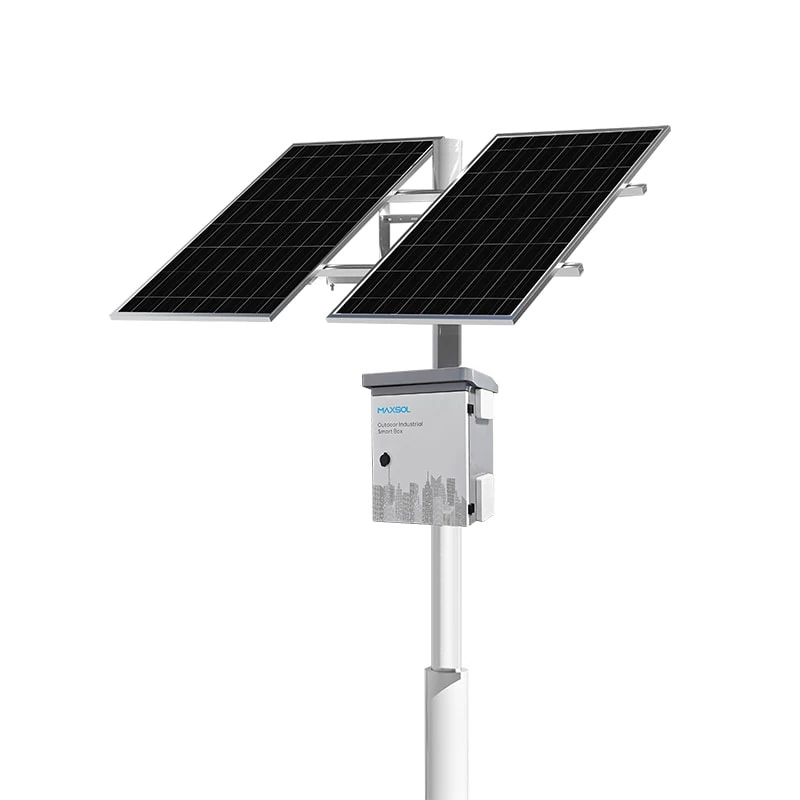
Solar Security Cameras for Farms, Car Parks and Remote Sites
Compare solar security camera needs for New Zealand farms, car parks and remote facilities, including power, wireless links, mounting and servicing.
By Maxsol Team

Solar powered security cameras can cover farms, car parks and remote facilities where mains power or fixed data cabling is impractical. However, the right design depends strongly on the site: farms usually need dispersed coverage, car parks need reliable identification at defined entry points, and remote facilities prioritise autonomy and straightforward fault recovery.
Treat the camera, solar power system and network connection as separate design elements. Calculate the complete electrical load, inspect shade and mounting conditions, confirm the communications path, then set a realistic maintenance plan. The linked Maxsol products provide power or networking functions; they do not provide camera imaging, recording or analytics.
Farm boundaries and agricultural buildings
Farm surveillance often involves several different coverage tasks across one property. A camera watching a gate has different power, lens and connectivity requirements from one monitoring a machinery shed, stock access lane or distant boundary.
The first decision is whether each location needs continuous recording, event-triggered recording or live viewing on demand. That choice affects both data traffic and energy demand. Other camera features—including infrared illumination, heaters, microphones and motorised movement—can also change consumption between daytime, night-time and active operation.
Typical farm design issues include:
- Long distances between the camera and the nearest network connection
- Shelterbelts, hills, sheds or terrain blocking wireless line of sight
- Dust, insects, moisture and animal interference around equipment
- Seasonal shade changes from trees or buildings
- Machinery movements that could damage low-mounted equipment
- Several small sites rather than one central camera cluster
- Limited access during wet conditions or busy periods
A wireless bridge can be useful where a farm office or house has network access and the camera location has clear line of sight back to it. Before specifying one, record the path distance, elevation at both ends, obstructions, expected interference and mounting height. A long-range label alone does not confirm that a link will work at a particular property.
For isolated boundaries without a viable wireless path, a cellular router or local recorder may be more appropriate, but its power consumption and coverage must be included in the design. Do not assume the camera’s advertised wattage represents the whole site load.
Mounting also needs practical thought. A pole at a boundary may provide a clear camera view but expose the solar panel to livestock, vehicles and wind. An agricultural building may offer a more protected equipment location, yet cast shade over the panel at critical times. Camera view, wireless line of sight and solar exposure should therefore be checked separately.
Car park entrances and open parking areas
Car parks generally have more concentrated coverage than farms. The difficult part is often not seeing activity across the site, but capturing useful detail at entrances, exits, payment areas or pedestrian access points.
At an entrance, camera positioning must account for vehicle direction, speed, headlights, number plate angle and the width of the capture zone. These are camera-system requirements and cannot be solved by selecting a larger solar panel or battery. The surveillance designer should define the image objective before the power equipment is sized.
Open parking areas introduce a different set of constraints:
- Lighting columns may provide mounting positions but not necessarily continuous power.
- Trees, signs and nearby buildings can shade panels at different times of year.
- Tall poles may improve coverage while making batteries and electronics harder to service.
- Publicly accessible cabinets need suitable environmental and impact protection.
- Multiple cameras on one pole can raise both peak and daily energy demand.
- Wireless links may encounter reflections or blockage from vehicles and structures.
Where an existing network endpoint is visible from the entrance or lighting pole, a point-to-point bridge may avoid trenching data cable. The path still requires a survey. Clear visual line of sight does not automatically guarantee the radio clearance, interference conditions or throughput needed by the selected cameras.
Car park systems may also have predictable periods of high activity. If recording, wireless traffic or infrared lighting increases overnight, use the higher operating load rather than a daytime average. A design based only on a camera’s minimum consumption can produce a system that appears adequate in daylight but loses autonomy when night functions operate.
Equipment protection should be specified independently of camera image requirements. The distinction between ingress protection and resistance to physical impact is explained in this guide to IP65 and IK10 for outdoor CCTV enclosures. An IP rating and an IK rating address different hazards, so neither should be treated as a substitute for the other.
Remote facilities with limited service access
Remote pump stations, communications sites, storage compounds and utility structures place greater emphasis on autonomy, remote visibility and recoverability. A minor fault that is inexpensive to fix near a workshop can become costly when a technician must travel a long distance to reach the site.
For these facilities, design around the consequences of failure as well as the average electrical load. Questions to answer include:
- How long can the site operate without useful solar charging?
- What happens after low-voltage protection disconnects the load?
- Will the system restart automatically when energy is available?
- Can technicians distinguish a power fault from a network or camera fault remotely?
- Is there safe physical access to the panel, enclosure and mounting hardware?
- Which replacement parts and tools are needed for one service visit?
- Does loss of the communications link stop recording, or is footage retained locally?
Monitoring can help with diagnosis, but it does not create additional energy or replace scheduled inspection. Battery state data, controller alarms and network status are only useful if the selected equipment exposes the required information and the wider management system can read it. Confirm the supplied configuration rather than assuming every product includes remote management.
Remote sites also need conservative assumptions about weather and access. There is no universal number of battery days that suits every New Zealand deployment. Required autonomy depends on the measured load, local solar exposure, seasonal shading, acceptable outage risk, battery operating conditions and how quickly the site can be serviced.
If the facility is operationally important, document degraded modes. For example, the design might prioritise one fixed camera and local recording while temporarily disconnecting non-essential equipment. That is a system-control decision and must be supported by the actual controller, wiring and devices; it should not be assumed from nominal battery capacity alone.
Compare power, connectivity and mounting needs
The following matrix compares hypothetical design scenarios rather than customer installations or measured product performance.
| Requirement | Farm boundary or building | Car park entrance or open area | Remote facility |
|---|---|---|---|
| Coverage objective | Gates, sheds, lanes or separated boundary points | Defined entry lanes, pedestrian areas or broad overview zones | Perimeter, access door and critical equipment |
| Shade risk | Trees, shelterbelts, roofs and seasonal vegetation | Buildings, signs, lighting poles and landscaping | Terrain, structures, antenna towers or unmanaged vegetation |
| Mounting priorities | Clearance from animals, machinery and farm operations | Stable image angle, public safety and resistance to interference | Durability, safe technician access and space for service work |
| Connectivity | Farm Wi-Fi extension, directional bridge, cellular connection or local recording | Directional bridge to a nearby building, existing network infrastructure or cellular connection | Long-distance wireless, cellular, local recording or a combination |
| Autonomy emphasis | Depends on access difficulty and operational importance | Must cover overnight loads and periods of high activity | Usually a central requirement because service response may be slow |
| Service access | May be restricted by terrain, weather or farming activity | Often physically accessible, but traffic management may be required | Potentially infrequent, expensive or dependent on specialist travel |
| Common design mistake | Treating all farm camera points as identical | Sizing from daytime camera load only | Using nominal battery Wh as guaranteed usable energy |
| Information needed at handover | Site map, camera purpose, wireless path and access notes | Capture-zone plan, pole details, night load and cabinet location | Fault logic, restart behaviour, monitoring method and spares plan |
Across all three scenarios, the most important distinction is where complexity sits. Farm designs tend to be dominated by distance and dispersed assets. Car park designs are usually driven by image objectives, mounting geometry and night operation. Remote facilities require careful energy budgeting, fault recovery and maintenance planning.
Select components by measured requirements
Component selection should begin with a load schedule, not a panel wattage or battery label. Record the minimum, typical and maximum consumption of every powered device, including:
- Cameras in day and night modes
- Infrared or white-light illuminators
- Wireless bridges and access points
- Cellular routers
- Network switches or PoE converters
- Local recorders and storage devices
- Controllers, monitoring equipment and cabinet accessories
For a simple first-pass energy budget, multiply each device’s operating watts by its expected hours of operation. Add appropriate engineering allowances for conversion losses, temperature, ageing, variable loads and the required reserve. Those allowances must be selected for the actual design; they are not fixed universal percentages.
As a hypothetical assumption, a site drawing a constant 18W would consume 432Wh over 24 hours before losses and reserves:
18W × 24 hours = 432Wh per day
This is a calculation example only, not a runtime claim for any Maxsol system. Nominal battery watt-hours are not the same as usable delivered energy, and they do not guarantee continuous operation.
For smaller measured loads, the Maxsol CS12060 120W and 768Wh solar power system is one comparison point. Its documented configuration includes a 120W monocrystalline panel, 12.8V 60Ah 768Wh LiFePO4 battery, MPPT controller and three DC12V outputs; RS485 is optional.
Where the measured load or autonomy requirement is higher, the Maxsol CS400150 400W and 1920Wh solar power system provides another selection reference. It documents two 200W panel modules, a 12.8V 150Ah 1920Wh LiFePO4 battery, MPPT control and four DC12V outputs.
These are not interchangeable recommendations based solely on site type. A farm gate does not automatically need the smaller system, and a remote facility does not automatically need the larger one. Use the documented electrical limits, measured load and site energy assessment to compare them.
For either system, confirm the current datasheet and supplied configuration, particularly:
- Controller PV voltage, current and power limits
- Battery charging-temperature requirements and protection
- Output voltage and connector compatibility
- Number of independently required outputs
- Cable voltage drop at the intended distance
- Earthing, surge protection and isolation arrangements
- Monitoring interfaces included in the supplied version
- Enclosure and mounting suitability for the site environment
The step-by-step principles in this guide to sizing an off-grid solar power system for CCTV can support the calculation, but site measurements and device datasheets remain essential.
For network backhaul, the Maxsol CPE295 5.8GHz directional wireless CPE documents a 2×2 14dBi directional MIMO antenna, one Gigabit LAN port, IEEE 802.3af/at or 9–48V DC power support, and 6.5W full-load consumption. If it is expected to operate continuously, its load must be included in the daily energy budget.
Product range and wireless-rate labels do not guarantee site distance or application throughput. Verify line of sight, radio-path clearance, interference, mounting alignment and applicable New Zealand radio requirements. Also confirm whether the camera, injector, switch and CPE power interfaces are electrically compatible. The linked solar and wireless products are selection examples, not a tested compatible bundle.
Plan maintenance and acceptance checks
A solar camera site should be handed over with measurable acceptance criteria rather than a general statement that it is operating. The installer, network designer and end user should agree on what will be checked, who owns each item and which results must be recorded.
Requirements handover
A practical handover schedule should include:
- Coverage objective: State what each camera must observe or identify, including the required day and night conditions.
- Electrical load: List every device, operating voltage, measured or manufacturer-specified consumption, peak behaviour and operating hours.
- Solar assessment: Record panel orientation, tilt, known shade periods and any vegetation-management requirement.
- Autonomy target: Define the required operating period without useful charging and the acceptable response to low energy.
- Network design: Document link endpoints, path distance, mounting heights, line-of-sight findings, channel plan and expected traffic.
- Mounting details: Record pole or structure type, equipment height, cable routes, enclosure access and protection from vehicles, animals or interference.
- Recording behaviour: Confirm whether footage is stored locally, remotely or both, and what occurs during a network outage.
- Fault recovery: Document low-voltage shutdown, automatic restart and any manual reset procedure.
- Service plan: Set inspection intervals based on the environment and identify required tools, spares and access arrangements.
- Configuration records: Retain device settings, network addressing, approved credentials process and current datasheets.
Acceptance checks
Before final acceptance, test the complete system under representative conditions:
- Confirm camera framing during daylight and darkness.
- Check that night illumination does not create unwanted reflections.
- Measure load in normal and highest-consumption operating modes.
- Verify charging and load-output behaviour against controller documentation.
- Check cable voltage at the device while it is operating.
- Test wireless stability and usable application throughput, not only signal indication.
- Simulate loss and restoration of network connectivity.
- Confirm local recording continues as designed during a link outage.
- Test the documented low-energy response where this can be done safely.
- Inspect panel shading, fasteners, cable protection and enclosure sealing.
- Confirm technicians can reach serviceable parts without disturbing camera alignment.
- Record baseline readings so later maintenance visits can identify changes.
Common mistakes include accepting a system after a brief sunny-day test, relying on nominal battery capacity as guaranteed runtime, and testing the wireless connection without active video traffic. Another is leaving responsibility gaps between the camera installer, solar designer and network contractor. A single requirements handover should show who verifies each interface.
The practical next step is to compare the linked Maxsol models with the project’s actual port count, measured load, path distance, power interfaces, environmental conditions and management requirements. Confirm current datasheets and supplied configurations before treating any power or networking component as compatible with the selected cameras.